Engineering
Build an AI Video Rendering Backend with Zvid
Convert probabilistic AI output into validated Zvid template data with schemas, previews, render jobs, signed webhooks, policy checks, and approval gates.
By Mina RamzyPublished Updated
Build an AI Video Rendering Backend with Zvid
An AI video rendering backend should never assume that a language or multimodal model produced safe, complete, renderable instructions. Treat AI output as an untrusted proposal. Validate it against an application schema, apply content and media policies, map it into a versioned Zvid template, preview boundary cases, submit a render job, and reconcile the result through signed webhooks.
This boundary combines two different strengths. AI can draft, classify, summarize, select, or personalize. Zvid can resolve a controlled JSON project, validate template variables, expand conditions and arrays, queue the media job, render video or images, and return a result. Your application remains responsible for authorization, truth, safety, rights, approvals, and source identity.
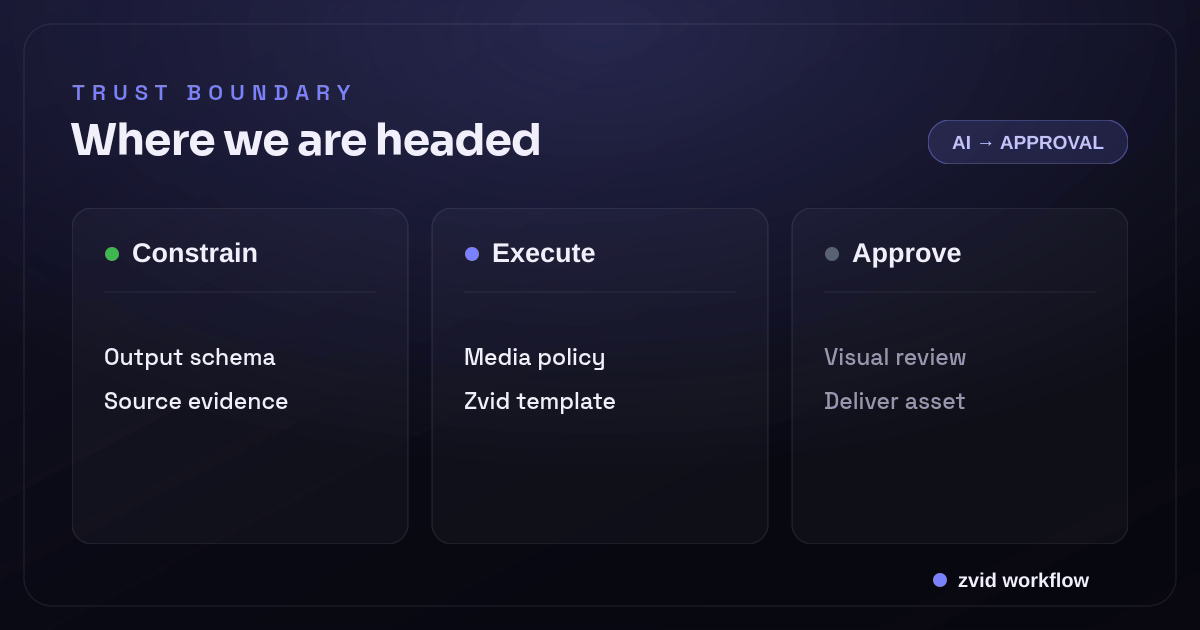
Constrain, Execute, and Approve form one reviewable Zvid workflow.
The core rule: AI proposes, the application decides
Do not give a model an API key and ask it to call a render endpoint with arbitrary JSON. Do not accept model-generated HTML, CSS, JavaScript, remote URLs, durations, or array sizes without policy checks.
Use this flow:
user/source data
  -> authorized generation request
  -> AI proposal
  -> schema validation
  -> content and media policy
  -> deterministic normalization
  -> approved template mapping
  -> Zvid preview/validation
  -> render job
  -> signed completion event
  -> visual or human approval
  -> delivery
Every arrow is an observable state. A failure should say whether the AI response was invalid, the content policy rejected it, media resolution failed, the template did not resolve, or the render job failed.
Start with a product-specific output schema
Suppose an AI product turns an approved source document into a 20-second feature explainer. Ask the model for a narrow plan:
{
  "schemaVersion": "feature-explainer@2",
  "title": "Turn call notes into next steps",
  "subtitle": "A short workflow for revenue teams",
  "features": [
    {
      "heading": "Summarize",
      "body": "Capture the decision and open questions.",
      "mediaQuery": "team reviewing a sales call dashboard"
    },
    {
      "heading": "Draft",
      "body": "Prepare the follow-up while context is fresh.",
      "mediaQuery": "writing an action plan in a software workspace"
    },
    {
      "heading": "Route",
      "body": "Assign the task to the correct owner.",
      "mediaQuery": "workflow routing cards to team members"
    }
  ],
  "showCta": true,
  "cta": "Review the full workflow",
  "sourceClaims": [
    {"text": "Turn call notes into next steps", "sourceRef": "brief:p3"}
  ]
}
The model does not choose a Zvid template ID, callback URL, output dimensions, CSS, arbitrary media URL, or publish destination. Trusted application code supplies those values.
Validate:
- Exact schema version
- Required fields and no unexpected properties
- String lengths tested by the creative
- Feature count within the template limit
- Allowed languages and character sets for the selected template
- Boolean flags as booleans, not strings
- Source references for factual claims
- No executable or markup fields
JSON parsing success is only the first check. Use a JSON Schema or typed runtime validator and return path-specific errors.
Preserve source evidence beside generated copy
The backend should know where every material fact came from. Keep source documents, document revisions, retrieved passages, and model metadata with the generation record.
For higher-risk content, require each claim to reference an allowed source span and verify that the span supports the statement. A model can produce fluent but unsupported copy; video motion does not make it more accurate.
Separate:
- Source facts: approved product capabilities, prices, dates, policies, names
- Creative language: hook, transitions, concise phrasing
- Prohibited invention: statistics, customer quotes, guarantees, certifications, or offers not present in approved sources
Human approval remains appropriate for external marketing, regulated topics, customer-specific content, and any workflow where a wrong statement has meaningful impact.
Resolve media through a trusted service
A model's mediaQuery is a search hint, not a render URL. A media service can:
- Search an approved internal or licensed library.
- Filter by orientation, resolution, rights, and client.
- Score semantic fit.
- Run safety and duplicate checks.
- Return an approved stable URL and asset ID.
- Route uncertain selections for review.
The resulting internal plan becomes:
{
  "features": [
    {
      "heading": "Summarize",
      "body": "Capture the decision and open questions.",
      "mediaAssetId": "AST-88021",
      "mediaUrl": "https://cdn.example.com/approved/AST-88021.mp4"
    }
  ]
}
Do not render arbitrary model-provided URLs. Enforce https, block private and link-local destinations, constrain redirects and size, and preserve rights evidence. Prefer account uploads or stable controlled CDN assets for durable production.
Map the approved plan to a Zvid template
Build the creative in the Zvid Editor. Define the canvas, timeline, scenes, typography, captions, and motion visually, then save the project as a template. The application maps approved values into its variables:
function toZvidRender(plan: ApprovedExplainerPlan) {
  return {
    template: selectApprovedTemplate({
      tenantId: plan.tenantId,
      format: plan.format,
      schemaVersion: plan.schemaVersion,
    }),
    variables: {
      title: plan.title,
      subtitle: plan.subtitle,
      features: plan.features.map((feature) => ({
        heading: feature.heading,
        body: feature.body,
        mediaUrl: feature.mediaUrl,
      })),
      showCta: plan.showCta,
      cta: plan.cta ?? '',
      logoUrl: plan.brand.logoUrl,
      accent: plan.brand.accent,
    },
    overrides: {
      name: plan.outputName,
    },
    webhookUrl: process.env.ZVID_WEBHOOK_URL,
  };
}
The template ID comes from authorized application configuration. Brand values come from a controlled profile. The callback URL comes from server configuration. None is delegated to the model.
Use iterate for a bounded AI-generated list
{
  "id": "feature",
  "iterate": "features",
  "iterateAs": "feature",
  "duration": 3.2,
  "transition": "slideleft",
  "visuals": [
    {
      "type": "VIDEO",
      "src": "{{feature.mediaUrl}}",
      "width": 1920,
      "height": 1080,
      "resize": "cover",
      "volume": 0
    },
    {"type": "TEXT", "text": "{{feature.heading}}"},
    {"type": "TEXT", "text": "{{feature.body}}"}
  ]
}
Zvid generates one scene per feature. The application schema should impose the creative limit—perhaps two to four features—even though Zvid's default platform iteration limit is broader and plan-dependent.
Array iteration is a controlled way to accept variable structure. It is safer than letting a model emit arbitrary scene objects with unlimited elements or duration.
Use condition for explicit optional branches
{
  "id": "cta",
  "condition": "{{showCta}}",
  "duration": 2,
  "visuals": [
    {"type": "TEXT", "text": "{{cta}}", "position": "center-center"}
  ]
}
Zvid conditions accept a boolean value or placeholder. The model may propose showCta, but trusted code applies product policy before the value reaches the template. For example, a support summary may never include a marketing CTA regardless of model output.
Avoid expression-like strings such as "featureCount > 2"; Zvid intentionally does not evaluate arbitrary expressions in condition.
Preview the resolved template before final render
Template preview is a valuable trust boundary. POST /api/templates/{id}/preview can resolve request variables and expose template problems without committing to a full production render. The editor also previews variable values, first iterated items, and condition states on the stage.
Preview can catch:
- Undeclared or unresolved placeholders
- Incorrect variable paths
- Array and condition type errors
- Copy overflow visible on the stage
- Missing or badly cropped media
- Brand contrast failures
- Optional scenes that leave awkward transitions
For high-volume generation, preview a boundary fixture set for every template revision and sample live plans based on novelty or risk. Do not spend a full render retry fixing an error that deterministic validation could catch first.
Create a durable job before submission
Use a local state machine:
requested
  -> generating
  -> generated
  -> policy_review
  -> media_resolved
  -> previewed
  -> submitting
  -> queued
  -> rendered
  -> media_review
  -> approved
  -> delivered
Store:
- User, tenant, and source identity
- Generation model and prompt/workflow version
- Raw proposal and validation errors
- Approved normalized plan
- Source references and policy decisions
- Media asset IDs and rights records
- Template ID and revision
- Zvid job ID, output URL, and checksum
- Review and delivery decisions
Create the local render row before calling Zvid, and use an idempotency key so a client retry cannot generate duplicate work.
Submit and reconcile the render job
{
  "template": "tpl_xxxxxxxxxxxxxxxxxxxx",
  "variables": {
    "title": "Turn call notes into next steps",
    "subtitle": "A short workflow for revenue teams",
    "features": [
      {
        "heading": "Summarize",
        "body": "Capture the decision and open questions.",
        "mediaUrl": "https://cdn.example.com/approved/AST-88021.mp4"
      }
    ],
    "showCta": true,
    "cta": "Review the full workflow"
  },
  "overrides": {"name": "explainer-REQ-20442"},
  "webhookUrl": "https://app.example.com/hooks/zvid"
}
Zvid validates the resolved project, enforces active plan limits, and returns a job ID when accepted. Store it transactionally.
Use a registered Zvid webhook for HMAC-signed account events and a delivery log. Verify the raw body and timestamp, persist the event idempotently, and update the local row by stored job ID. Reconcile old non-terminal rows through GET /api/jobs/{id} so a missed event cannot strand a request.
Render completion means the file exists. It does not prove the content or composition is approved.
Repair failures by stage
Do not send every failure back to the language model. Classify it:
| Failure | Correct owner | Typical action |
|---|---|---|
| Model output is not valid JSON | Generation layer | Retry once with constrained response; record failure |
| Schema path is invalid | Generation/mapper | Repair only allowed fields or regenerate |
| Unsupported claim | Policy or human review | Reject or replace from approved source |
| Media query has no approved result | Media service | Choose a reviewed fallback or request user media |
| Template variable unresolved | Template deployment | Block release; fix template or mapper |
| Copy overflows visually | Creative/system policy | Tighten copy limit or route for editorial rewrite |
| Zvid submission validation fails | Mapper/template/config | Do not retry unchanged; fix field-level cause |
| Render fails on a transient asset fetch | Operations/media | Retry only when source and policy permit |
| Video is technically valid but poor | Creative review | Revise template, data, or media; do not auto-publish |
Limit automated repair loops. Preserve the original proposal and every attempt so a system does not silently drift from the source.
Scale with bulk after single-item quality is stable
Zvid bulk rendering accepts one template plus multiple variable sets. Use it when:
- Every item already passed schema and policy checks.
- Media is resolved and rights-approved.
- The template revision passed boundary previews.
- Source-to-item mapping is durable.
- The application can recover item-level failures.
The endpoint queues valid items and returns invalid ones in itemErrors with original indexes. Each accepted item becomes an independent render job and sends its own terminal event.
Do not generate thousands of AI plans first and inspect quality at the end. Start with a small, stratified sample, review failures, tighten the schema and template, then increase volume.
Render still images from the same governed system
AI products often need a thumbnail, social card, or report cover alongside the video. Zvid supports native PNG, JPG/JPEG, and WebP image jobs, including bulk image rendering. Use an approved image project or template with the same source identity and brand profile.
Keep image and video job IDs separate. A video poster may use different safe areas and text limits than a social card even when they share copy.
Observe quality as well as infrastructure
Track technical signals:
- Generation and schema failure rates
- Policy rejection categories
- Media-resolution hit and review rates
- Preview and Zvid validation failures by field
- Queue, render, and webhook latency
- Job failure reason and retry count
Track product-quality signals:
- Human approval rate
- Revision reason by template and model version
- Unsupported-claim incidence
- Copy overflow or crop failures
- Media mismatch rate
- Delivery or publish rejection
Correlate every metric with the model workflow, schema, mapper, template, and media policy versions. Otherwise a quality decline is impossible to locate.
Security boundaries for an AI rendering backend
- Keep model, Zvid, storage, and publishing credentials server-side.
- Authorize tenant, template, brand, media, and destination independently.
- Treat prompts, retrieved documents, model output, and URLs as untrusted.
- Limit request bytes, strings, arrays, duration, and generated attempts.
- Block SSRF and unsafe redirects during media resolution.
- Do not pass arbitrary model markup into HTML, CSS, JavaScript, or SVG fields.
- Redact personal data and signed asset URLs from logs.
- Apply retention and deletion rules to prompts, sources, plans, and outputs.
- Require explicit approval before irreversible external publication.
The AI layer expands the attack and error surface. A narrow template contract reduces it.
Separate the AI layer from the rendering engine
An AI video backend may contain several compute paths. A generative AI model proposes text or media. An AI image service may create a still. A video generation model may create a clip. A rendering engine then composites approved assets, typography, animation, captions, and audio into the deliverable. Calling all of those stages “AI rendering” makes failures hard to isolate.
The infrastructure boundary matters too. A team that owns server-side video rendering may schedule GPU and CPU workers, manage an NVIDIA or other accelerator stack, pin codec dependencies, and operate the render queue. A managed renderer moves those concerns behind an integration while the application continues to own prompts, source evidence, policy checks, approvals, and job identity.
Design the pipeline so each artifact is reproducible: model request, model response, approved plan, media identities, resolved Zvid project, render job, and delivered asset. That makes a dependency upgrade or model change observable. It also lets a developer rerender an approved project without asking the generative model to reinterpret the prompt.
Real Zvid example: governed AI product demo
The video below is rendered by Zvid from the ai-tool-demo example, adapted to the feature-explainer contract. Its feature scenes come from a bounded variable array and its CTA is conditional. The rendered media is the actual result of the governed backend path described here.
A real Zvid render adapted from the published ai-tool-demo example for this workflow.
The trust-boundary image above is also rendered through Zvid. It shows exactly where probabilistic generation ends and validated media execution begins.
Frequently asked questions
Should an AI model generate the full Zvid project JSON?
Usually not for a production product. Ask it for a narrow application object, validate and approve that object, then map it to a versioned template. Trusted internal tools may generate fuller projects behind strict validation.
Is a valid schema enough to make AI video safe?
No. Schema validation checks structure. Content accuracy, policy, authorization, media rights, URL safety, visual quality, and publication approval require additional controls.
Can Zvid render AI-generated images and copy together?
Yes, when the resulting media is available through an approved public or uploaded URL and the copy maps to template variables. The workflow must still verify rights, safety, and visual fit.
When should bulk rendering be introduced?
After the schema, policy, media resolver, template, preview fixtures, single-item rendering, and approval process are stable. Bulk multiplies both successes and unresolved quality problems.
Use AI for variation and Zvid for governed execution
The reliable architecture does not ask one model call to be writer, art director, security policy, timeline compiler, renderer, and publisher. It gives each layer a clear contract.
AI proposes bounded content. The application validates, verifies, authorizes, and maps it. Zvid resolves the approved template, validates the project, renders video or images, and delivers job events. A review gate decides whether the result is fit to use. That separation is what turns a compelling demo into an operable AI video backend.