Tutorials
Shopify Abandoned Cart Recovery Videos
Create a personalized Shopify abandoned cart recovery video with n8n or Node.js. Preview one checkout, check the render cost and review optional email delivery.
 By Mina RamzyPublished
A useful abandoned-cart message starts with the products a shopper left behind. A useful automation also checks whether that shopper has already bought them before it sends anything.
This Shopify abandoned cart recovery video workflow combines those two jobs. It selects one abandoned checkout, waits, checks Shopify again, then turns the shopper's first name, product photos and cart total into a short Zvid video. Optional email delivery includes links to the video and the original checkout. A later conversion check can stop the follow-up.
Follow the n8n route below to configure the workflow visually. The Prefer Node.js? section supplies the matching design in a complete script with saved-run recovery and separately confirmed email delivery.
See what the workflow creates
Clay Pocket Oversized Tee · $35 · 13.8 seconds · 1080 × 1920
Download the sample MP4 ↓
One checkout, three scenes
The video greets Alex, shows the tee left in the cart, then closes with the $35 total and a call to complete the order.
Sample input: a fictional customer, one Clay Pocket Oversized Tee, size M, quantity 1. The fixture contains no real customer contact details.
Output: a vertical MP4 to review before using it in a recovery message. The video uses an existing product photo and has no audio by default.
The design uses up to three product lines. The size and quantity remain in the input but are not printed in the current video. Email, phone and the private checkout link are excluded from the rendered project. The first name and shopping details remain visible, so treat a live output as customer-related content, even though it has a shareable media URL.
1. Get the workflow and prepare your accounts
Open Recover abandoned Shopify checkouts with personalized Zvid product video emails on n8n, or its Zvid workflow page.
Use the maintained download for the steps below. Its Zvid actions use the official community node. The embedded recording and screenshots show an earlier demonstration; the written node names, defaults and limitations describe the maintained JSON.
Watch the walkthrough
See the full workflow
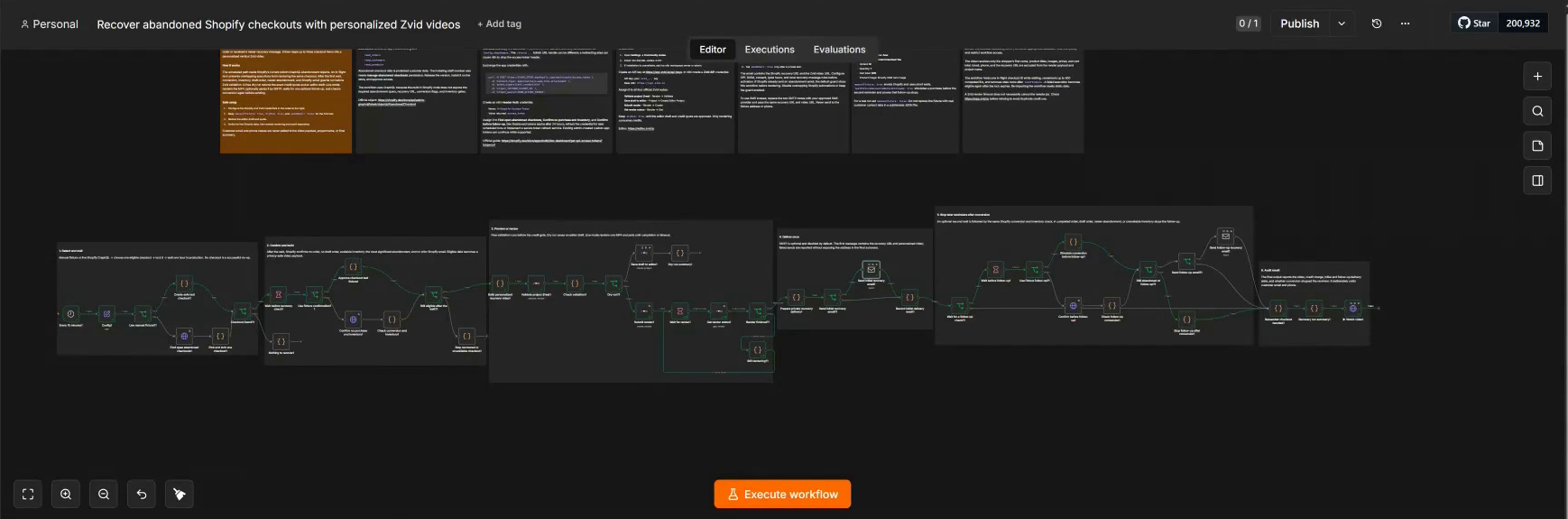
You need n8n, a Zvid account and permission to install the Zvid community package. The included fixture lets you preview without Shopify access. Live checkout reads need a Shopify app and the required customer-data access. SMTP is needed only if you choose automatic email delivery.
2. Install, import and connect credentials
Keep the schedule inactive while setting up.
- In n8n, open Settings → Community nodes and install
@zvid/n8n-nodes-zvid. A workspace owner or admin may need to do this. The Zvid n8n setup guide covers the supported integration. - Create a workflow, open its menu and choose Import from file. Select the downloaded JSON.
- At Zvid API Keys, choose Create API Key, name the key and copy it when shown. See Zvid authentication if needed.
- Create a Zvid API credential in n8n with that key and Base URL
https://api.zvid.io. Select it on Validate project (free), Save draft to editor, Submit render and Get render status.
Obtain the Shopify Admin API token
For live checkouts, create an app in Shopify's Dev Dashboard, add read_orders, read_customers and read_products to its version, release it and install it on the target store. The installing user also needs Manage abandoned checkouts. Shopify documents that requirement on the abandonedCheckouts query. Check protected customer data access if customer fields are unavailable.
For an app and store in the same Shopify organization:
- Open the app's App settings and find its Client ID and Client secret.
- Use Shopify's client credentials instructions to send a form-encoded POST to
https://YOUR-SUBDOMAIN.myshopify.com/admin/oauth/access_token, withgrant_type=client_credentials,client_idandclient_secret. - Copy the returned
access_token, not either app credential. Check the returned scopes andexpires_in. Keep all these values private. - In n8n, create a Header Auth credential with name
X-Shopify-Access-Tokenand the token as its value. - Select it on Find open abandoned checkouts, Confirm no purchase and inventory, and Confirm before follow-up.
The Shopify app-creation guide covers the installation screens. For a merchant outside your app's organization, use the appropriate OAuth installation flow instead of assuming the own-organization grant applies.
Plan for token expiry. Client-credentials tokens last 24 hours. This workflow does not renew them. Refresh the credential before expiry, including before a waiting execution resumes, or add a secure renewal mechanism before scheduling. Other Shopify authorization flows have different token lifetimes.
In Shopify Admin Settings → Domains, find the canonical *.myshopify.com domain. Put only its subdomain in Config.shopDomain. The handle in an Admin /store/... URL can differ; a redirecting alias can cause authentication failures.
Connect SMTP only when you need it
Leave sendEmail: false during preview and video review. Later, create an n8n SMTP credential using your email provider's host, username and password or app password. Port 465 normally uses SSL/TLS; port 587 uses STARTTLS. Match the provider's instructions and n8n's SMTP setup guide.
Assign it to Send initial recovery email and Send follow-up recovery email. Set emailFrom to a verified sender. The fixture's alex@example.com is illustrative, not a test inbox you control.
3. Choose a small input
Open Config and keep the supplied Alex checkout for the first preview.
| Setting | Shipped value | First check | What it controls |
|---|---|---|---|
manualFixture |
true |
true |
Uses the fictional checkout instead of reading Shopify. |
dryRun |
false |
true |
Creates a validated editor draft instead of a paid MP4. |
sendEmail |
false |
false |
Controls both SMTP branches. |
testFixtureRecoveredBeforeFollowUp |
true |
true |
Simulates a purchase before the fixture follow-up. |
followUpEnabled |
true |
false for your first render review |
Avoids waiting for a follow-up before the final video summary. |
scanLimit |
20 |
20 |
Number of live candidates read from the first page, capped at 50. |
recoveryWaitMinutes |
60 |
60 |
Live delay before the first eligibility check; the fixture uses two seconds. |
followUpWaitMinutes |
720 |
720 |
Twelve-hour live follow-up delay when enabled. |
Set brandName, storeUrl, colors and the call-to-action text to the store you represent. The fixture maps Alex to the greeting, the tee image and title to the product scene, and totalPrice: "35.00" to the closing total. It does not create product photos or invent a discount.
For the first live read, set manualFixture: false while retaining dryRun: true and sendEmail: false. Run manually and inspect Find open abandoned checkouts. An HTTP 200 response without GraphQL errors confirms the read worked; Nothing to recover is a normal result when that candidate page has no eligible checkout.
4. Preview and check the estimate
With the fixture and dryRun: true, click Execute workflow. Build personalized recovery video creates the three scenes, and Validate project (free) checks the project and returns creditsRequired. Resolve validation errors before continuing. See validation and estimates for what the quote covers.
Open Dry run summary and follow editorLink. Watch the draft in the editor, checking the name, crop, title, price and closing call to action. The draft is an editable project, not a completed MP4. Saving or previewing it does not submit a render.
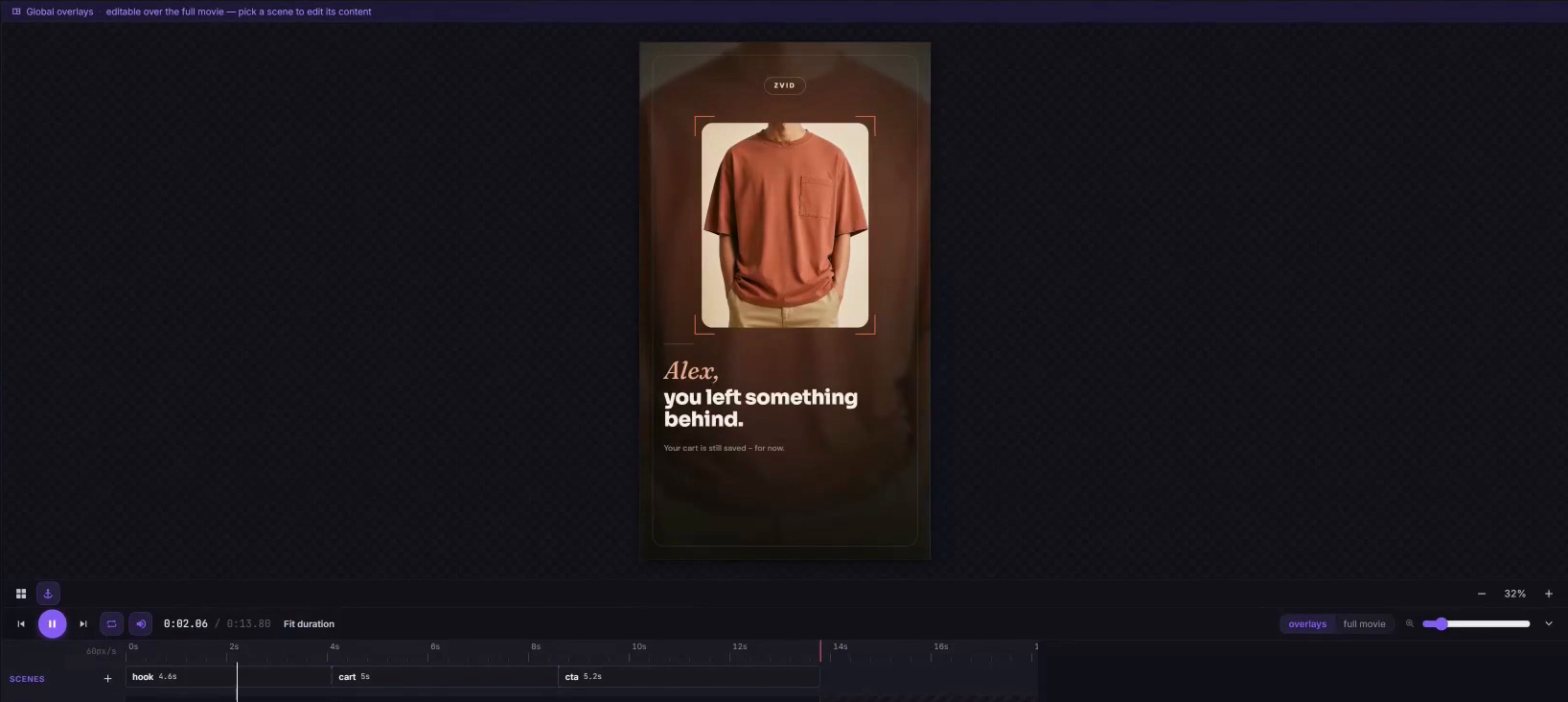
If editorLink is missing, inspect editorDraftError and Save draft to editor. A successful validation alone does not prove the draft was saved. Keep the quote with your review; a changed duration, resolution or input can change it.
5. Render, watch and save
Once the preview looks right, set dryRun: false. Keep sendEmail: false and set followUpEnabled: false for this first video review. Run the same fixture again.
Submit render queues a paid job. Wait for render and Get render status check it until completion. The default polling interval is ten seconds, with a twenty-minute timeout. In Recovery run summary, save jobId and videoUrl.
Open ▶ Watch video → Binary → data → View to play the MP4 in n8n. You can also open videoUrl in your browser and download it. Store a copy you intend to keep; rendered-output availability depends on the account's plan and the job's expiry. See Zvid output availability.
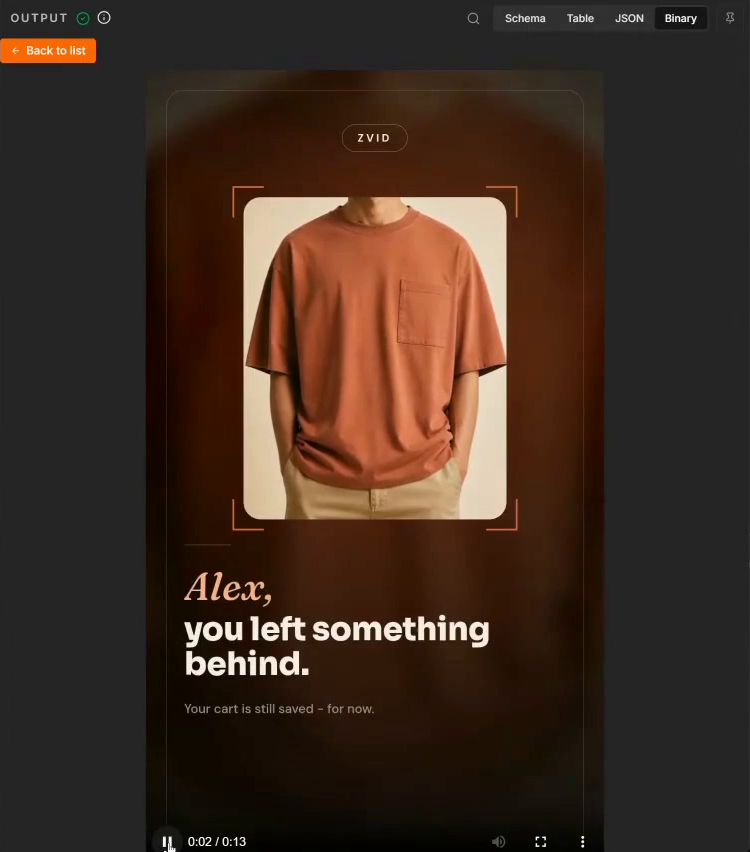
If you leave live follow-up enabled, the final summary and Watch video node can wait twelve hours. The completed URL is available earlier in Prepare private recovery delivery. A timeout does not cancel an accepted render: inspect its saved job in the Zvid dashboard before starting the whole workflow again.
6. Use the result in a recovery message
The video includes a visual call to action. The clickable checkout link belongs in the email, alongside a link to watch the video; the workflow does not embed a playable MP4 inside the email body.
You can use the reviewed assets in your existing recovery tool. Before enabling the n8n SMTP branch, review the sender, recipient, message and checkout link, and coordinate with any recovery messages your store already sends. The template does not collect consent, manage unsubscribes or provide a per-message approval screen.
With manualFixture: false and sendEmail: true, n8n sends to the customer email returned for the selected checkout. The first live check skips purchases, draft orders, unavailable inventory, a newer significant abandonment, and Shopify recovery emails when skipIfShopifyAlreadyEmailed is enabled. With follow-up enabled, it checks conversion and availability again after the delay.
Two details matter before activation: the current n8n follow-up branch does not require a successful initial SMTP send, and the checkout is remembered as handled even when sending is disabled or fails. Inspect initialEmailSent, initialEmailError, followUpEmailSent and followUpEmailError in the result. A rendered video is not proof that an email reached an inbox.
Do not turn on sendEmail and rerun the entire workflow just to send a previously reviewed MP4. That can create another paid render. Deliver the saved assets through a separate reviewed handoff, or use the Node.js companion's explicit delivery command for its saved runs.
Customize, then increase the batch
Change the brand colors, fonts, greeting and CTA in Config. Review the default urgency copy against the store's actual policy; this workflow does not reserve inventory or establish a checkout deadline. Add a public music URL only if you want audio and have permission to use it.
Test a long product title, a missing photo and two or three product lines before expanding. The design falls back to a numbered tile when an image is absent. For larger carts, it shows only the first three lines while retaining the supplied full cart total. Configure currencySymbol for the store rather than assuming every currency uses $.
Each live run selects one checkout from a single candidate page; it is not a complete scan of all abandoned checkouts. The schedule is every fifteen minutes. Before activating it, check the n8n timezone, token renewal, execution retention and the existing email automations serving the same shoppers.
The template keeps up to 500 handled IDs and uses temporary in-flight records. These are n8n static data, not a durable messaging ledger. Static data is saved after successful triggered executions, is unavailable during manual tests and has high-frequency limitations. Do not rely on manual tests or overlapping runs as proof of duplicate protection. See n8n's static-data documentation.
Costs and practical limits
Validation returns a credit quote without reserving credits. Rendering consumes credits; the included 13.8-second sample was quoted at 14 credits. Use your current creditsRequired rather than treating that quote as a fixed price. The n8n download does not enforce a configurable spending ceiling; the Node.js companion requires one. Zvid's credit guide explains duration and resolution pricing.
n8n hosting and SMTP may have their own charges. The workflow does not generate AI footage, publish ads, add a Shopify discount or report recovered revenue. It checks eligibility at defined points, so a purchase can still happen between a check and a send. Live execution history and private delivery data need appropriate access controls.
Prefer Node.js?
The companion works without an n8n server. It includes the same three-scene builder, a synchronized n8n export, the fictional checkout, offline tests and a runnable command-line workflow. It derives the displayed currency from Shopify's returned currency code; n8n uses the manually configured currencySymbol.
Install Node.js 20.12 or newer, extract the download and open a terminal in the example folder. In Windows PowerShell, use npm.cmd instead of npm for commands that forward options after --.
npm ci
npm run check
npm test
npm run offline
These commands build the fictional project without credentials, render credits or email. Copy .env.example to .env, keep it private, and fill in ZVID_API_KEY. Then create a preview:
npm run dry-run
Open editorLink in out/preview/result.json. After approving the quote, render the fixture with an explicit ceiling:
npm run sample -- --max-credits 20
Twenty is the example ceiling, not the price. A higher quote stops before submission. The MP4 URL and job receipt go into out/sample-render/result.json; open videoUrl to watch and download. Fixture sends are blocked by the script.
For a live checkout, also set SHOPIFY_SHOP_DOMAIN and SHOPIFY_ACCESS_TOKEN using the setup above. The CLI records the first recovery-wait deadline and exits. After checkAt in its result file, resume the saved checkout:
npm start -- --dry-run
npm start -- --resume --dry-run
npm start -- --resume --max-credits 20
Run the second command after the saved deadline and the third after preview approval. Results are in out/live/. A render interruption is recovered with npm start -- --resume, which polls its saved job without submitting it again. An ambiguous submission without a receipt requires dashboard inspection.
Send only the reviewed live result
After rendering, review initial-email.html, the video and the checkout recipient in the private output directory. Set SMTP_HOST, SMTP_PORT, SMTP_USER, SMTP_PASSWORD and a verified SMTP_FROM in .env. Set CONFIRM_RECIPIENT privately to the exact reviewed checkout address. Then choose the explicit send action:
npm start -- --resume --deliver initial
The script rechecks eligibility and the current recipient before SMTP. It records success only after server acceptance. An interrupted or ambiguous send is blocked from automatic retry; inspect your provider's logs before reconciling it.
For a follow-up, wait the configured twelve hours after the confirmed initial send, review again, then run:
npm start -- --resume --deliver follow-up
This reuses the existing video and rechecks Shopify. Node does not run a background follow-up service or renew Shopify tokens. Keep the same output directory when resuming and the same checkout ledger for a store; deleting or separating the ledger removes its duplicate protection. The complete README covers local locking, private files and manual recovery.
Start with one checkout
Import the n8n JSON, keep emails disabled and preview the fictional Alex checkout. Review the video and its quote before rendering. Move to one live checkout only after Shopify access works and you have decided how the result will enter your existing recovery process.
Frequently asked questions
Does this recover abandoned carts or abandoned checkouts?
The Shopify source is abandoned checkouts, where the shopper supplied contact information but did not complete the purchase. It does not identify anonymous visitors who only added a product to a cart.
Does the n8n template send email immediately?
No. It ships with sendEmail: false. Rendering is enabled by default through dryRun: false, so switch to preview mode before the first execution. Enabling email is a separate choice; the n8n template has no additional recipient approval screen.
Can I preview without spending Zvid render credits?
Yes. Set dryRun: true to validate and create an editor draft. It produces a quote and preview link, not a finished MP4. Rendering later spends credits.
Why did my Shopify connection stop working the next day?
Check token expiry. Tokens from the own-organization client-credentials flow last 24 hours. Neither supplied implementation renews them, and a pending follow-up still needs valid credentials when it resumes.
Will the video expose the shopper's email or checkout link?
Those fields, and the phone number, are excluded from the rendered project. The first name and product details remain visible. Email and the private recovery URL are still used in delivery and may appear in private execution records, which should not be published.
Can I safely rerun a failed workflow?
Inspect its render and delivery records first. A timed-out render may already exist, and an SMTP timeout does not prove nothing was sent. The Node.js companion resumes an accepted job and blocks ambiguous delivery retries. A full n8n rerun can repeat paid work.
Does the workflow prove that a video increased conversions?
No. It creates recovery assets and checks whether a shopper purchased before later actions. It does not measure the video's incremental effect or promise a conversion rate.
For help with Zvid, visit https://zvid.io/contact.