Use Cases
Video Automation for Agencies: Templates, Variants, and Approval
Build an agency video automation system with client templates, brand variables, controlled A/B hooks, bulk renders, approval states, and signed webhooks.
By Mina RamzyPublished Updated
Video Automation for Agencies: Templates, Variants, and Approval
Video automation for agencies should reduce repeated production work while making client ownership clearer. The durable system has four layers: a reusable creative template, an authorized client brand profile, an approved campaign brief, and a set of controlled variants. Zvid renders those layers into videos and images; the agency workflow handles permissions, review, revisions, publishing, and reporting.
The failure mode is to treat automation as “replace the logo and headline.” That creates brand leaks, weak creative, uncontrolled variant counts, and files nobody can trace back to an approval. A premium workflow instead makes every output reproducible from the client, template, brief, variant, and job IDs.
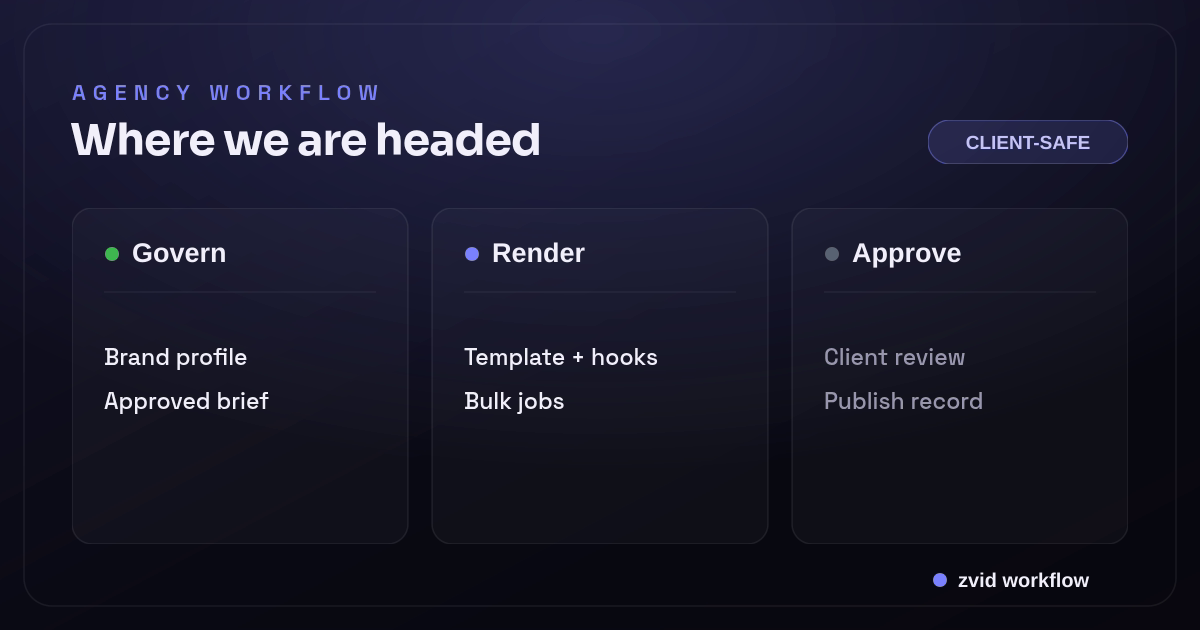
Govern, Render, and Approve form one reviewable Zvid workflow.
Decide what should be automated
Good automation candidates have:
- A repeatable campaign format
- Approved brand rules
- A known data source
- Bounded copy and media variation
- Enough volume or revision frequency to justify a template
- A review process that can evaluate consistent outputs
Examples include product collections, location campaigns, weekly reports, hiring ads, case-study snippets, event promos, and performance-creative packs.
Keep one-off brand films, complex narrative work, and experimental art direction in a custom production path. Zvid can still render them, but forcing them into a high-volume template may not improve the work.
Model client isolation explicitly
At minimum, every record should carry agencyId and clientId. Do not infer client ownership from a filename or folder path.
agency
  client
    brand profile
    approved templates
    campaigns
      briefs
      variant sets
      renders
      approvals
      publication records
Enforce ownership at each API boundary:
- A user can access only authorized clients.
- A campaign can select only templates approved for that client.
- Media URLs must belong to the client or an approved licensed library.
- A render event can update only the local row with the matching Zvid job ID.
- Review links use scoped, expiring access.
- Publishing credentials remain isolated per destination account.
If the agency uses a shared Zvid account, local authorization remains essential. A template ID is an identifier, not an access-control policy.
Turn the brief into a bounded contract
Illustrative campaign input:
{
  "campaignId": "CMP-ORBIT-Q3-DEMO",
  "clientId": "CLIENT-ORBIT",
  "briefRevision": 6,
  "objective": "Drive qualified demo visits",
  "audience": "Revenue operations leaders",
  "productName": "Orbit",
  "productLine": "Turn every call into an assigned next step",
  "heroMediaUrl": "https://cdn.example.com/orbit/campaign/hero.mp4",
  "proofPoints": [
    {"title": "Call summary", "detail": "Structured while the conversation is fresh"},
    {"title": "Next-step draft", "detail": "Prepared from the approved workflow"},
    {"title": "Owner routing", "detail": "Sent to the right queue"}
  ],
  "hooks": [
    {"variantId": "hook-a", "text": "Your best sales calls should not end in a blank CRM"},
    {"variantId": "hook-b", "text": "What happens between a good call and the next action?"}
  ],
  "cta": "See the workflow",
  "showDisclosure": false,
  "approvalId": "APP-ORBIT-1607"
}
The example is fictional. In production, proof claims, disclaimers, testimonials, offers, and media need client approval and evidence.
The campaign service validates lengths, arrays, media, approved vocabulary, CTA policy, and variant count. It also freezes the brief revision before rendering so an edit cannot change a batch halfway through.
Keep brand profiles separate from campaign data
{
  "brandProfileId": "BRAND-ORBIT-4",
  "logoLightUrl": "https://cdn.example.com/orbit/brand/logo-light.svg",
  "logoDarkUrl": "https://cdn.example.com/orbit/brand/logo-dark.svg",
  "primary": "#7C3AED",
  "accent": "#2DD4BF",
  "fontFamily": "Inter",
  "voice": "clear-direct",
  "approvedTemplateIds": ["tpl_xxxxxxxxxxxxxxxxxxxx"]
}
Only expose brand tokens the template is designed to accept. A variable color does not guarantee accessible contrast or a harmonious composition. Preview each approved profile and keep template-specific overrides where needed.
If clients have materially different visual systems, use separate templates. One universal template with dozens of brand flags becomes difficult to review and can leak decisions across accounts.
Build and promote templates deliberately
The Zvid Editor lets the creative team design on a canvas and timeline, add media and captions, declare variables, preview resolved data, and save the project as a template. The API uses the same project JSON.
Use a lifecycle:
draft project -> internal review -> client proof -> approved template -> active -> retired
Store locally:
- Zvid template ID
- Internal template family and revision
- Client and format authorization
- Variable schema and creative limits
- Proof fixtures used in approval
- Approver and date
- Active and retirement timestamps
Do not edit an active template in place and assume prior approvals still apply. Duplicate it, make changes, rerun boundary fixtures, obtain approval, then promote the new ID.
Expose a narrow Zvid variable surface
{
  "variables": {
    "logoUrl": "https://cdn.example.com/logo.svg",
    "primary": "#7C3AED",
    "accent": "#2DD4BF",
    "productName": "Orbit",
    "productLine": "Turn every call into an assigned next step",
    "heroMediaUrl": "https://cdn.example.com/hero.mp4",
    "proofPoints": [],
    "hook": "Your best sales calls should not end in a blank CRM",
    "cta": "See the workflow",
    "showDisclosure": false,
    "disclosure": ""
  }
}
Variables should be visible in the creative brief or brand profile. Keep implementation-only layout values in the template. Use condition for optional disclosure or CTA sections and iterate for bounded proof points.
{
  "id": "proof-point",
  "iterate": "proofPoints",
  "iterateAs": "proof",
  "duration": 2.2,
  "visuals": [
    {"type": "TEXT", "text": "{{proof.title}}"},
    {"type": "TEXT", "text": "{{proof.detail}}"}
  ]
}
{
  "id": "disclosure",
  "condition": "{{showDisclosure}}",
  "duration": 2,
  "visuals": [
    {"type": "TEXT", "text": "{{disclosure}}"}
  ]
}
Zvid conditions accept booleans, not arbitrary expressions. The campaign service determines whether disclosure is required and supplies approved copy.
Treat A/B variants as a controlled matrix
A variant should test one declared hypothesis. For example:
- Hook A versus Hook B
- Product demo versus customer proof media
- CTA A versus CTA B
- 15-second versus 25-second template family
Do not create the Cartesian product of every possible difference by default. Two hooks × three CTAs × four colors × five media clips creates 120 outputs without a clear learning plan.
Represent the approved pack:
{
  "variantSetId": "VARSET-ORBIT-16",
  "hypothesis": "Question-led hook improves qualified hold rate",
  "variants": [
    {"variantId": "control", "hookId": "hook-a", "ctaId": "cta-control"},
    {"variantId": "question", "hookId": "hook-b", "ctaId": "cta-control"}
  ]
}
Keep the tested dimension, not just the copy, so reporting can explain why the outputs exist.
Render a variant pack with the bulk endpoint
Zvid's bulk rendering endpoint accepts one template, shared variables, and per-item values:
{
  "template": "tpl_xxxxxxxxxxxxxxxxxxxx",
  "name": "orbit-q3-hook-test",
  "variables": {
    "logoUrl": "https://cdn.example.com/orbit/logo.svg",
    "primary": "#7C3AED",
    "accent": "#2DD4BF",
    "productName": "Orbit",
    "productLine": "Turn every call into an assigned next step",
    "heroMediaUrl": "https://cdn.example.com/orbit/hero.mp4",
    "proofPoints": [
      {"title": "Call summary", "detail": "Structured while the conversation is fresh"},
      {"title": "Owner routing", "detail": "Sent to the right queue"}
    ],
    "cta": "See the workflow",
    "showDisclosure": false
  },
  "items": [
    {
      "name": "orbit-q3-control",
      "variables": {"hook": "Your best sales calls should not end in a blank CRM"}
    },
    {
      "name": "orbit-q3-question",
      "variables": {"hook": "What happens between a good call and the next action?"}
    }
  ],
  "webhookUrl": "https://agency.example.com/hooks/zvid"
}
Zvid validates items independently. Valid rows become jobs; invalid rows are returned in itemErrors with their original indexes. Store variantId -> bulk index -> jobId. Repair failed rows without rerendering successful variants.
Bulk output count remains subject to the account's active maxBulkItems limit. The API reports the current limit in validation errors.
Use webhooks to update production state
Registered Zvid webhooks can deliver render.completed and render.failed events with HMAC signatures, retry handling, and a delivery log. A receiver should:
- Verify the timestamp and signature against the raw body.
- Deduplicate by delivery and terminal job state.
- Match the Zvid job ID to the local client and variant row.
- Store output URL or failure reason.
- Return quickly after durable receipt.
- Queue thumbnail generation, client review, or repair separately.
Never accept a client ID from the event and use it to choose the tenant. Resolve ownership from the job ID already stored during submission.
Make client review a first-class state
brief_draft
  -> brief_approved
  -> rendering
  -> internal_review
  -> client_review
  -> approved
  -> scheduled
  -> published
The review surface should show:
- The actual rendered video and poster
- Variant ID and hypothesis
- Brief and template revisions
- Exact copy and media sources
- Structured comments tied to time or scene where possible
- Approve, reject, or request-change action
- Decision identity and timestamp
Do not email unlabeled MP4s and reconstruct approvals from a message thread. A job can complete successfully and still be creatively or factually wrong.
Process revisions without losing history
Classify requested changes:
- Data revision: copy, media, offer, or CTA changes; rerender the same approved template.
- Template revision: layout, timing, typography, or motion changes; create and approve a new template revision.
- Brand revision: logo, color, font, or brand rule changes; update the brand profile and rerun profile fixtures.
- Strategy revision: audience, objective, or format changes; return to the brief.
Create a new render record for each attempt. Do not overwrite the prior output URL or approval decision. Mark which render supersedes which and why.
Prevent brand and data leaks
Agency automation is multi-tenant software even when built as an internal tool. Protect it accordingly:
- Scope database queries by agency and client.
- Use separate object-store prefixes and signed review links.
- Restrict template IDs by client.
- Validate media URLs and block private-network destinations.
- Redact signed URLs, customer data, and API secrets from logs.
- Keep social publishing tokens outside render payloads.
- Audit template promotion, render submission, approval, and publication.
- Define retention for drafts, outputs, and client-offboarding data.
Use fictional or approved data in template previews. A shared creative proof should not expose another client's unreleased campaign.
Report from stable identities
Connect campaign performance to:
- Client and campaign ID
- Brief revision
- Template family and revision
- Variant set and hypothesis
- Variant ID
- Zvid render job ID and output checksum
- Publish destination and platform ID
- Approval decision
Platform metrics differ, so avoid merging unlike definitions into one universal “view” without clear normalization. Compare controlled variants within the same placement and time window.
Rendering success, approval rate, revision count, time in each workflow state, and invalid-input rate are also useful operational signals. They reveal where the agency system needs better briefs, templates, or validation.
Where AI agents fit in agency video automation
An AI agent can help an agency classify briefs, draft hook options, or route work, but it should not quietly approve client claims or publish a finished asset. Treat AI automation as an upstream proposal layer. The client profile, approved brief, template version, render variables, and final approval should remain explicit application records.
That boundary is how an agency can streamline video production without mixing brands. An automation platform may trigger short-form video jobs, connect storage, and notify reviewers. Zvid renders the approved composition. A client-safe review portal records which version was accepted. None of those pieces alone is a fully automated creative department.
The highest-value goal is to save time on repeatable work: variable mapping, video creation, bulk fan-out, job reconciliation, and delivery. Keep content creation, strategic judgment, and final claims review with the right people. This reduces manual editing where a template already answers the design question while preserving human review where the answer changes by client or campaign.
Scale the agency system with explicit customization
For videos at scale, define which fields clients may customize and which remain locked. Brand colors, logo, CTA, approved copy, and selected media can be variables; typography, safe areas, disclosure placement, and output policy may remain template rules. That makes customization predictable and prevents one client request from becoming an unmaintainable fork.
An automation tool can then automate video intake seamlessly, but each job still records client, template, source revision, reviewer, and destination. This reduces production time and supports automated video content without confusing scaling with zero oversight. The agency can leverage AI video generation for proposed assets while the approved video creation process remains auditable.
Real Zvid example: an agency hook test pack
The video below is rendered by Zvid from the agency-ab-pack example, adapted to the illustrative Orbit campaign from this guide. From one approved template it produces the controlled two-hook test pack — variant A with the control hook and variant B with the question-led hook — exactly the orbit-q3-hook-test structure described above.
A real Zvid render adapted from the published agency-ab-pack example for this workflow.
The workflow image above is also rendered by Zvid. Together they show the system and its actual product: a traceable video variant, not a decorative concept image.
Frequently asked questions
Can an agency use one Zvid template for every client?
Only when the visual system genuinely supports every approved profile. Materially different brands and formats are usually clearer and safer as separate template families.
How should A/B video variants be generated?
Define one hypothesis, freeze the shared campaign data, create a small explicit variant set, and submit those variable differences through a bulk render request.
Does a Zvid bulk request fail if one variant is invalid?
Items are validated independently. Valid items can become jobs while invalid items are returned in itemErrors by index, unless the envelope is malformed or every item fails.
Should completed renders go directly to publishing?
Not by default. Route them through internal and client approval states, then let a separate authorized workflow schedule or publish the approved asset.
Scale the system, not the chaos
Agency video automation becomes valuable when it formalizes creative operations: approved templates, isolated brand profiles, versioned briefs, intentional variants, durable job mapping, and accountable review. Zvid handles the shared editor/API project, template resolution, bulk rendering, and completion delivery.
That division lets an agency increase output while making it easier—not harder—to answer which client, brief, creative, data, and approval produced every video.