Post-Event Recap
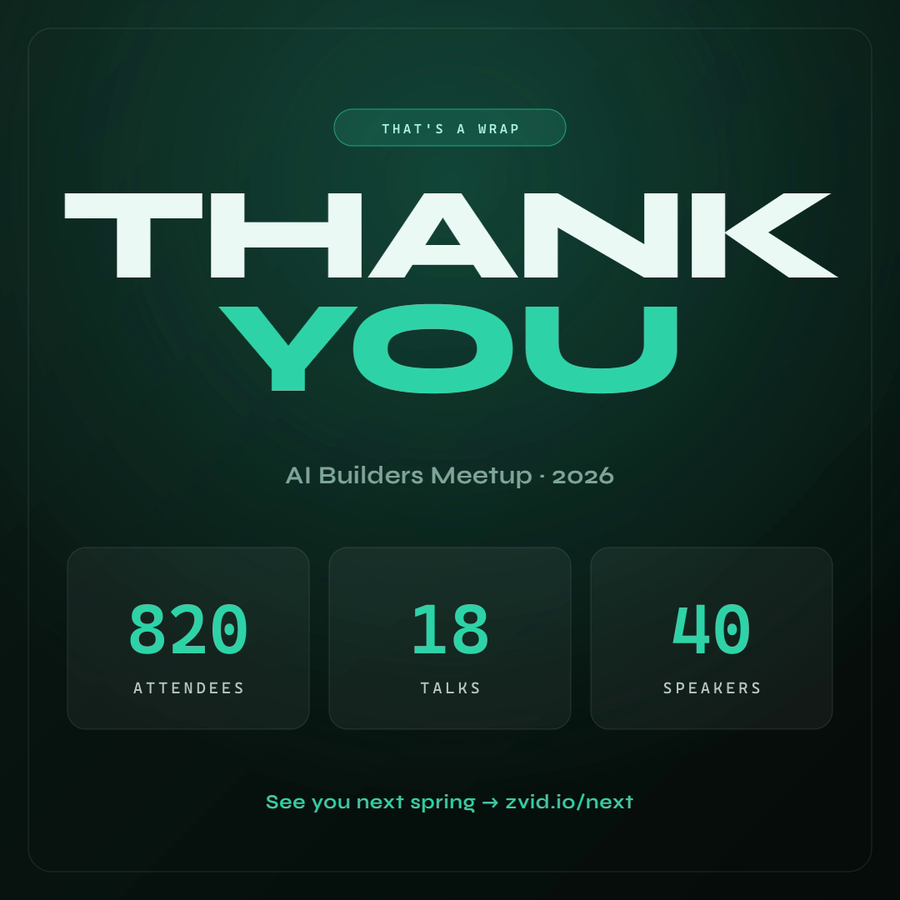
Dark recap card with a THANK YOU lockup and three stat tiles plus a next-time cue — swap stats, event, next cue and mint accent.
- Type
- Image
- Format
- Instagram Post · 1:1
- Orientation
- Square
- Render credits
- 1
Template ID
img-event-recapLibrary identifier. Saved API templates have a separate ID starting with tpl_.
Free template · opens in the editor, no account required.
Customize Post-Event Recap
Post-Event Recap is a ready-to-render Events / webinars image design formatted for Instagram Post · 1:1 and support for variables. Open it in the editor to replace its copy and media, then render variations through the Zvid API.
13 variables: Every value below is a variable you can override — send them in the variables field of the render request (or edit them in the editor) to generate on-brand versions at scale.
eyebrowTextheadATextheadBTexteventNameTextstat1ValueTextstat1LabelTextstat2ValueTextstat2LabelTextstat3ValueTextstat3LabelTextnextCueTextinkColoraccentColorThe exact JSON payload
This is the full render config — POST it to the API, or open it in the editor to tweak.
{
  "type": "image",
  "name": "img-event-recap",
  "resolution": "instagram-post",
  "outputFormat": "png",
  "backgroundColor": "#08110E",
  "variables": {
    "eyebrow": "THAT'S A WRAP",
    "headA": "THANK",
    "headB": "YOU",
    "eventName": "AI Builders Meetup · 2026",
    "stat1Value": "820",
    "stat1Label": "ATTENDEES",
    "stat2Value": "18",
    "stat2Label": "TALKS",
    "stat3Value": "40",
    "stat3Label": "SPEAKERS",
    "nextCue": "See you next spring →  zvid.io/next",
    "ink": "#08110E",
    "accent": "#2DD4A7"
  },
  "visuals": [
    {
      "type": "SVG",
      "width": 1080,
      "height": 1080,
      "position": "center-center",
      "track": 0,
      "svg": "<svg width='1080' height='1080' viewBox='0 0 1080 1080' xmlns='http://www.w3.org/2000/svg'><defs><linearGradient id='bg' x1='0' y1='0' x2='1' y2='1'><stop offset='0' stop-color='#0C1A15'/><stop offset='0.6' stop-color='#08110E'/><stop offset='1' stop-color='#060C0A'/></linearGradient><radialGradient id='glow' cx='0.5' cy='0.2' r='0.7'><stop offset='0' stop-color='{{accent}}' stop-opacity='0.26'/><stop offset='1' stop-color='{{accent}}' stop-opacity='0'/></radialGradient></defs><rect width='1080' height='1080' fill='url(#bg)'/><rect width='1080' height='1080' fill='url(#glow)'/><rect x='34' y='34' width='1012' height='1012' rx='28' fill='none' stroke='#FFFFFF' stroke-opacity='0.08' stroke-width='1.5'/></svg>"
    },
    {
      "type": "SVG",
      "x": 400,
      "y": 130,
      "width": 280,
      "height": 46,
      "anchor": "top-left",
      "track": 4,
      "svg": "<svg width='280' height='46' viewBox='0 0 280 46' xmlns='http://www.w3.org/2000/svg'><rect x='1' y='1' width='278' height='44' rx='22' fill='{{accent}}' fill-opacity='0.14' stroke='{{accent}}' stroke-opacity='0.55' stroke-width='1.2'/><text x='140' y='30' font-family='IBM Plex Mono, monospace' font-size='16' font-weight='600' letter-spacing='3.5' fill='#B4F0E1' text-anchor='middle'>{{eyebrow}}</text></svg>"
    },
    {
      "type": "TEXT",
      "x": 40,
      "y": 214,
      "width": 1000,
      "anchor": "top-left",
      "track": 5,
      "style": {
        "fontFamily": "Syne"
      },
      "html": "<div style='font-size:158px; font-weight:800; line-height:0.86; letter-spacing:-0.03em; text-align:center; color:#EDFBF6;'>{{headA}}<br><span style='color:{{accent}};'>{{headB}}</span></div>"
    },
    {
      "type": "TEXT",
      "x": 40,
      "y": 552,
      "width": 1000,
      "anchor": "top-left",
      "track": 5,
      "text": "{{eventName}}",
      "style": {
        "fontFamily": "Syne",
        "fontSize": "30px",
        "fontWeight": "600",
        "letterSpacing": "0.02em",
        "textAlign": "center",
        "color": "#7FA79B"
      }
    },
    {
      "type": "SVG",
      "x": 80,
      "y": 656,
      "width": 920,
      "height": 220,
      "anchor": "top-left",
      "track": 5,
      "svg": "<svg width='920' height='220' viewBox='0 0 920 220' xmlns='http://www.w3.org/2000/svg'><rect x='1' y='1' width='290' height='218' rx='22' fill='#FFFFFF' fill-opacity='0.05' stroke='#FFFFFF' stroke-opacity='0.1' stroke-width='1.2'/><rect x='315' y='1' width='290' height='218' rx='22' fill='#FFFFFF' fill-opacity='0.05' stroke='#FFFFFF' stroke-opacity='0.1' stroke-width='1.2'/><rect x='629' y='1' width='290' height='218' rx='22' fill='#FFFFFF' fill-opacity='0.05' stroke='#FFFFFF' stroke-opacity='0.1' stroke-width='1.2'/><text x='146' y='128' font-family='IBM Plex Mono, monospace' font-size='84' font-weight='600' fill='{{accent}}' text-anchor='middle'>{{stat1Value}}</text><text x='146' y='176' font-family='IBM Plex Mono, monospace' font-size='19' font-weight='500' letter-spacing='4' fill='#B7C7C1' text-anchor='middle'>{{stat1Label}}</text><text x='460' y='128' font-family='IBM Plex Mono, monospace' font-size='84' font-weight='600' fill='{{accent}}' text-anchor='middle'>{{stat2Value}}</text><text x='460' y='176' font-family='IBM Plex Mono, monospace' font-size='19' font-weight='500' letter-spacing='4' fill='#B7C7C1' text-anchor='middle'>{{stat2Label}}</text><text x='774' y='128' font-family='IBM Plex Mono, monospace' font-size='84' font-weight='600' fill='{{accent}}' text-anchor='middle'>{{stat3Value}}</text><text x='774' y='176' font-family='IBM Plex Mono, monospace' font-size='19' font-weight='500' letter-spacing='4' fill='#B7C7C1' text-anchor='middle'>{{stat3Label}}</text></svg>"
    },
    {
      "type": "TEXT",
      "x": 40,
      "y": 948,
      "width": 1000,
      "anchor": "top-left",
      "track": 6,
      "text": "{{nextCue}}",
      "style": {
        "fontFamily": "Syne",
        "fontSize": "24px",
        "fontWeight": "600",
        "letterSpacing": "0.04em",
        "textAlign": "center",
        "color": "{{accent}}"
      }
    }
  ]
}
More Events / webinars templates
View all ↗


Ready to ship video at scale?
Start free — your first render is only a JSON payload away.