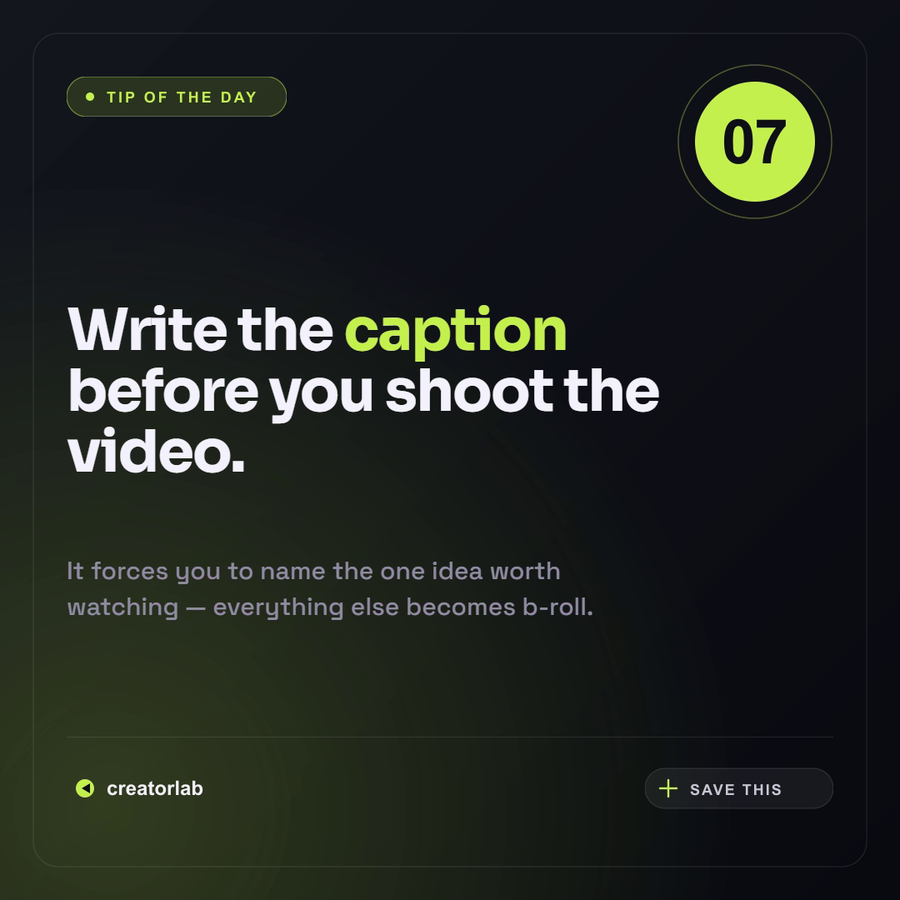
Tip Of The Day
Bold square tip card with a numbered badge, 'TIP' eyebrow and one punchy takeaway — swap the number, headline, body, brand and accent.
- Type
- Image
- Format
- Instagram Post · 1:1
- Orientation
- Square
Template ID
img-social-tipLibrary identifier. Saved API templates have a separate ID starting with tpl_.
Free template · opens in the editor, no account required.
Customize Tip Of The Day
Tip Of The Day is a ready-to-render Content creator / social image design formatted for Instagram Post · 1:1 and support for variables. Open it in the editor to replace its copy and media, then render variations through the Zvid API.
12 variables: Every value below is a variable you can override — send them in the variables field of the render request (or edit them in the editor) to generate on-brand versions at scale.
eyebrowTextnumberTexttitlePreTexthighlightTexttitlePostTexttipBodyTextbrandTextsaveLabelTextinkColoroffWhiteColormutedColoraccentColorThe exact JSON payload
This is the full render config — POST it to the API, or open it in the editor to tweak.
{
  "type": "image",
  "name": "img-social-tip",
  "resolution": "instagram-post",
  "outputFormat": "png",
  "backgroundColor": "#0E1015",
  "variables": {
    "eyebrow": "TIP OF THE DAY",
    "number": "07",
    "titlePre": "Write the",
    "highlight": "caption",
    "titlePost": "before you shoot the video.",
    "tipBody": "It forces you to name the one idea worth watching — everything else becomes b-roll.",
    "brand": "creatorlab",
    "saveLabel": "SAVE THIS",
    "ink": "#0E1015",
    "offWhite": "#F4F2FB",
    "muted": "#8F8CA3",
    "accent": "#C6F24E"
  },
  "visuals": [
    {
      "type": "SVG",
      "width": 1080,
      "height": 1080,
      "position": "center-center",
      "track": 0,
      "svg": "<svg width='1080' height='1080' viewBox='0 0 1080 1080' xmlns='http://www.w3.org/2000/svg'><defs><linearGradient id='bg' x1='0' y1='0' x2='1' y2='1'><stop offset='0' stop-color='#14171E'/><stop offset='0.55' stop-color='#0E1015'/><stop offset='1' stop-color='#0A0C10'/></linearGradient><radialGradient id='gl' cx='0.12' cy='0.9' r='0.7'><stop offset='0' stop-color='{{accent}}' stop-opacity='0.2'/><stop offset='1' stop-color='{{accent}}' stop-opacity='0'/></radialGradient></defs><rect width='1080' height='1080' fill='url(#bg)'/><rect width='1080' height='1080' fill='url(#gl)'/><rect x='40' y='40' width='1000' height='1000' rx='30' fill='none' stroke='#FFFFFF' stroke-opacity='0.08' stroke-width='1.5'/></svg>"
    },
    {
      "type": "SVG",
      "x": 80,
      "y": 92,
      "width": 264,
      "height": 48,
      "anchor": "top-left",
      "track": 4,
      "svg": "<svg width='264' height='48' viewBox='0 0 264 48' xmlns='http://www.w3.org/2000/svg'><rect x='0' y='0' width='264' height='48' rx='24' fill='{{accent}}' fill-opacity='0.14' stroke='{{accent}}' stroke-opacity='0.5' stroke-width='1.2'/><circle cx='28' cy='24' r='5' fill='{{accent}}'/><text x='48' y='31' font-family='Space Grotesk, Arial' font-size='18' font-weight='600' letter-spacing='3' fill='{{accent}}'>{{eyebrow}}</text></svg>"
    },
    {
      "type": "SVG",
      "x": 812,
      "y": 76,
      "width": 188,
      "height": 188,
      "anchor": "top-left",
      "track": 4,
      "svg": "<svg width='188' height='188' viewBox='0 0 188 188' xmlns='http://www.w3.org/2000/svg'><circle cx='94' cy='94' r='92' fill='none' stroke='{{accent}}' stroke-opacity='0.35' stroke-width='1.5'/><circle cx='94' cy='94' r='72' fill='{{accent}}'/><text x='94' y='120' font-family='Space Grotesk, Arial' font-size='74' font-weight='700' fill='{{ink}}' text-anchor='middle' letter-spacing='-2'>{{number}}</text></svg>"
    },
    {
      "type": "TEXT",
      "x": 80,
      "y": 360,
      "width": 800,
      "anchor": "top-left",
      "track": 5,
      "style": {
        "fontFamily": "Sora"
      },
      "html": "<div style='font-size:70px; font-weight:700; line-height:1.04; letter-spacing:-0.025em; color:{{offWhite}};'>{{titlePre}} <span style='color:{{accent}};'>{{highlight}}</span> {{titlePost}}</div>"
    },
    {
      "type": "TEXT",
      "x": 80,
      "y": 664,
      "width": 720,
      "anchor": "top-left",
      "track": 5,
      "text": "{{tipBody}}",
      "style": {
        "fontFamily": "Space Grotesk",
        "fontSize": "30px",
        "fontWeight": "500",
        "lineHeight": "1.42",
        "color": "#8F8CA3"
      }
    },
    {
      "type": "SVG",
      "x": 80,
      "y": 884,
      "width": 920,
      "height": 2,
      "anchor": "top-left",
      "track": 6,
      "svg": "<svg width='920' height='2' viewBox='0 0 920 2' xmlns='http://www.w3.org/2000/svg'><rect width='920' height='1' fill='#FFFFFF' fill-opacity='0.1'/></svg>"
    },
    {
      "type": "SVG",
      "x": 80,
      "y": 918,
      "width": 320,
      "height": 56,
      "anchor": "top-left",
      "track": 7,
      "svg": "<svg width='320' height='56' viewBox='0 0 320 56' xmlns='http://www.w3.org/2000/svg'><circle cx='22' cy='28' r='11' fill='{{accent}}'/><path d='M18 28 L28 22 L28 34 Z' fill='{{ink}}'/><text x='48' y='36' font-family='Space Grotesk, Arial' font-size='24' font-weight='600' fill='{{offWhite}}'>{{brand}}</text></svg>"
    },
    {
      "type": "SVG",
      "x": 774,
      "y": 918,
      "width": 226,
      "height": 56,
      "anchor": "top-left",
      "track": 7,
      "svg": "<svg width='226' height='56' viewBox='0 0 226 56' xmlns='http://www.w3.org/2000/svg'><rect x='0' y='4' width='226' height='48' rx='24' fill='#FFFFFF' fill-opacity='0.06' stroke='#FFFFFF' stroke-opacity='0.14' stroke-width='1'/><path d='M28 18 L28 38 M18 28 L38 28' stroke='{{accent}}' stroke-width='2.4' stroke-linecap='round'/><text x='54' y='36' font-family='Space Grotesk, Arial' font-size='18' font-weight='600' letter-spacing='2' fill='#C9C6D6'>{{saveLabel}}</text></svg>"
    }
  ]
}
More Content creator / social templates
View all ↗







Ready to ship video at scale?
Start free — your first render is only a JSON payload away.