Feature Demo
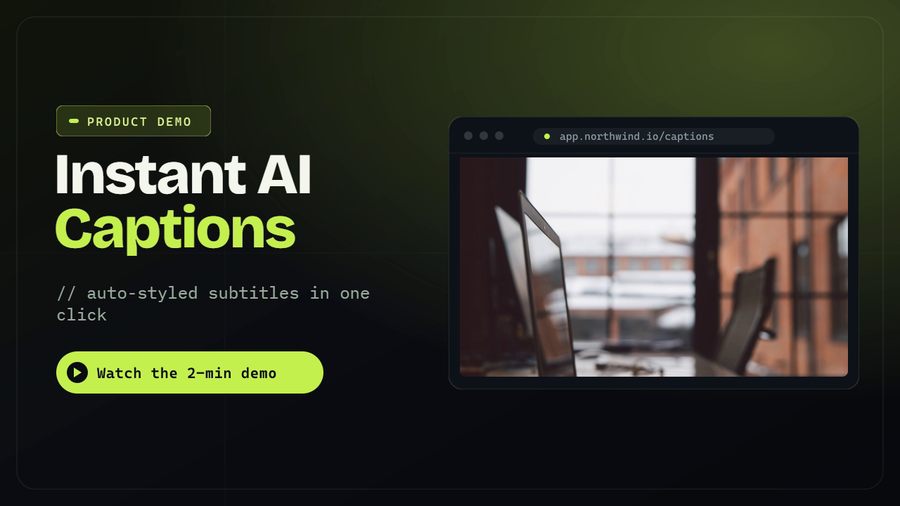
SaaS feature demo cover with a bold feature hook, DEMO tag and an app-window screenshot mockup — swap the UI screenshot, hook and accent.
- Type
- Image
- Format
- HD · 16:9
- Orientation
- Landscape
- Render credits
- 1
Template ID
img-thumb-feature-demoLibrary identifier. Saved API templates have a separate ID starting with tpl_.
Free template · opens in the editor, no account required.
Customize Feature Demo
Feature Demo is a ready-to-render Video thumbnails image design formatted for HD · 16:9 and support for variables, photo. Open it in the editor to replace its copy and media, then render variations through the Zvid API.
8 variables: Every value below is a variable you can override — send them in the variables field of the render request (or edit them in the editor) to generate on-brand versions at scale.
tagTexthookATexthookBTextsubTextctaTextdemoUrlTextaccentColoruiImageMedia URLThe exact JSON payload
This is the full render config — POST it to the API, or open it in the editor to tweak.
{
  "type": "image",
  "name": "img-thumb-feature-demo",
  "resolution": "hd",
  "outputFormat": "png",
  "backgroundColor": "#0C0E12",
  "variables": {
    "tag": "PRODUCT DEMO",
    "hookA": "Instant AI",
    "hookB": "Captions",
    "sub": "// auto-styled subtitles in one click",
    "cta": "Watch the 2-min demo",
    "demoUrl": "app.northwind.io/captions",
    "accent": "#C6F24E",
    "uiImage": "https://images.pexels.com/photos/3747070/pexels-photo-3747070.jpeg?auto=compress&cs=tinysrgb&w=1920&h=1920&fit=max&dpr=1"
  },
  "visuals": [
    {
      "type": "SVG",
      "width": 1280,
      "height": 720,
      "position": "center-center",
      "track": 0,
      "svg": "<svg width='1280' height='720' viewBox='0 0 1280 720' xmlns='http://www.w3.org/2000/svg'><defs><linearGradient id='bg' x1='0' y1='0' x2='1' y2='1'><stop offset='0' stop-color='#12160D'/><stop offset='0.5' stop-color='#0C0E12'/><stop offset='1' stop-color='#090A0D'/></linearGradient><radialGradient id='glow' cx='0.86' cy='0.1' r='0.7'><stop offset='0' stop-color='#C6F24E' stop-opacity='0.28'/><stop offset='1' stop-color='#C6F24E' stop-opacity='0'/></radialGradient></defs><rect width='1280' height='720' fill='url(#bg)'/><rect width='1280' height='720' fill='url(#glow)'/><line x1='320' y1='0' x2='320' y2='720' stroke='#FFFFFF' stroke-opacity='0.03' stroke-width='1'/><line x1='0' y1='360' x2='1280' y2='360' stroke='#FFFFFF' stroke-opacity='0.03' stroke-width='1'/><rect x='24' y='24' width='1232' height='672' rx='26' fill='none' stroke='#FFFFFF' stroke-opacity='0.07' stroke-width='1.5'/></svg>"
    },
    {
      "type": "SVG",
      "x": 638,
      "y": 166,
      "width": 584,
      "height": 388,
      "anchor": "top-left",
      "track": 2,
      "svg": "<svg width='584' height='388' viewBox='0 0 584 388' xmlns='http://www.w3.org/2000/svg'><rect x='0' y='0' width='584' height='388' rx='20' fill='#0F1418' stroke='#FFFFFF' stroke-opacity='0.12' stroke-width='1.5'/><circle cx='28' cy='27' r='6' fill='#FFFFFF' fill-opacity='0.16'/><circle cx='50' cy='27' r='6' fill='#FFFFFF' fill-opacity='0.16'/><circle cx='72' cy='27' r='6' fill='#FFFFFF' fill-opacity='0.16'/><rect x='120' y='16' width='344' height='24' rx='12' fill='#FFFFFF' fill-opacity='0.05'/><circle cx='140' cy='28' r='4' fill='{{accent}}'/><text x='158' y='33' font-family='IBM Plex Mono, monospace' font-size='15' fill='#8EA0A6'>{{demoUrl}}</text><line x1='0' y1='52' x2='584' y2='52' stroke='#FFFFFF' stroke-opacity='0.08' stroke-width='1'/></svg>"
    },
    {
      "type": "IMAGE",
      "src": "{{uiImage}}",
      "x": 654,
      "y": 224,
      "width": 552,
      "height": 312,
      "anchor": "top-left",
      "radius": {
        "tl": 0,
        "tr": 0,
        "bl": 8,
        "br": 8
      },
      "track": 3
    },
    {
      "type": "SVG",
      "x": 80,
      "y": 150,
      "width": 220,
      "height": 44,
      "anchor": "top-left",
      "track": 4,
      "svg": "<svg width='220' height='44' viewBox='0 0 220 44' xmlns='http://www.w3.org/2000/svg'><rect x='0' y='0' width='220' height='44' rx='10' fill='{{accent}}' fill-opacity='0.14' stroke='{{accent}}' stroke-opacity='0.55' stroke-width='1.2'/><rect x='18' y='19' width='14' height='6' rx='3' fill='{{accent}}'/><text x='44' y='29' font-family='IBM Plex Mono, monospace' font-size='17' font-weight='600' letter-spacing='2.5' fill='#DCF29A'>{{tag}}</text></svg>"
    },
    {
      "type": "TEXT",
      "x": 76,
      "y": 210,
      "width": 520,
      "anchor": "top-left",
      "track": 5,
      "style": {
        "fontFamily": "Bricolage Grotesque"
      },
      "html": "<div style='font-size:82px; font-weight:800; line-height:0.94; letter-spacing:-0.03em; color:#F4F6EE;'>{{hookA}}<br><span style='color:{{accent}};'>{{hookB}}</span></div>"
    },
    {
      "type": "TEXT",
      "x": 80,
      "y": 400,
      "width": 500,
      "anchor": "top-left",
      "track": 5,
      "text": "{{sub}}",
      "style": {
        "fontFamily": "IBM Plex Mono",
        "fontSize": "24px",
        "fontWeight": "400",
        "letterSpacing": "0em",
        "color": "#9BB0A0"
      }
    },
    {
      "type": "SVG",
      "x": 80,
      "y": 500,
      "width": 380,
      "height": 60,
      "anchor": "top-left",
      "track": 6,
      "svg": "<svg width='380' height='60' viewBox='0 0 380 60' xmlns='http://www.w3.org/2000/svg'><rect x='0' y='0' width='380' height='60' rx='30' fill='{{accent}}'/><circle cx='30' cy='30' r='15' fill='#0C0E12'/><path d='M25 23 L36 30 L25 37 Z' fill='{{accent}}'/><text x='58' y='38' font-family='IBM Plex Mono, monospace' font-size='21' font-weight='600' letter-spacing='0.5' fill='#0C0E12'>{{cta}}</text></svg>"
    }
  ]
}
More Video thumbnails templates
View all ↗
Ready to ship video at scale?
Start free — your first render is only a JSON payload away.