Tutorials
News Summary Video Template JSON
Build a source-aware news summary video template JSON in Zvid with iterated stories, date labels, preview checks, and a human review gate.
By Mina RamzyPublished
News Summary Video Template JSON
A news summary video template JSON should turn approved story records into a consistent reel without pretending that video rendering verifies the news. The safest split is simple: your editorial system verifies each headline, source, and date; Zvid applies the approved design, expands the story array into scenes, and renders the final video.
This guide provides a complete vertical template for that handoff. It is narrower than a general faceless video JSON workflow: the input is a reviewed story contract, source labels are visible, and rendering starts only after a human checks the resolved preview.
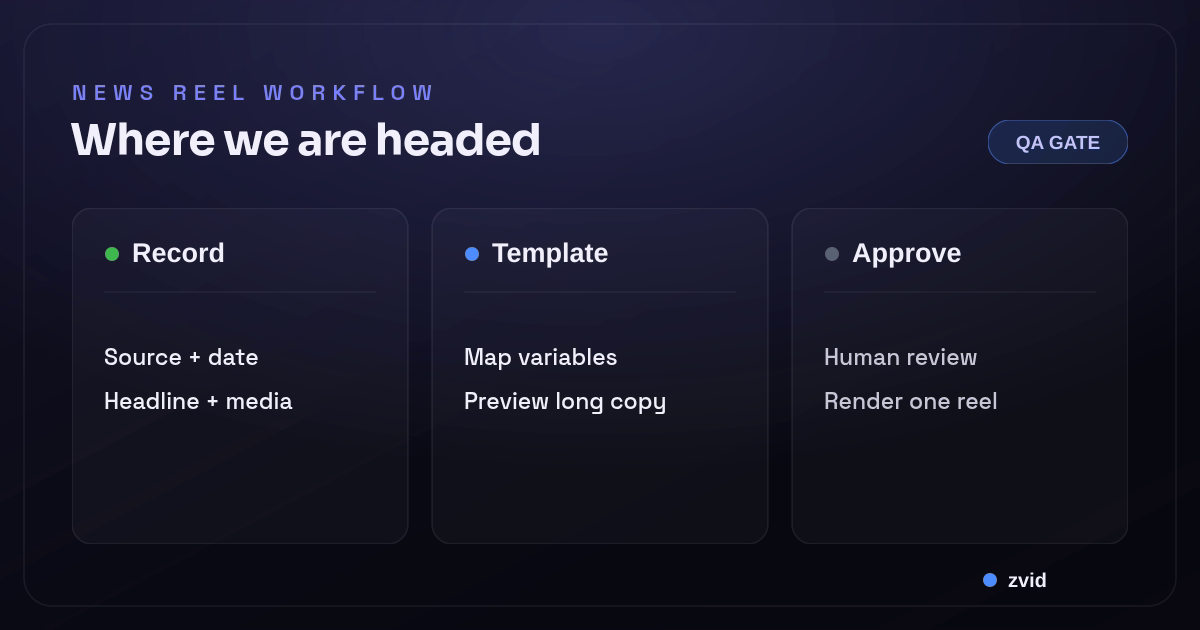
Verify the records, resolve the template, review the preview, then render one approved reel.
Define the story contract before the template
Do not send a scraped article or an unstructured model response straight to a renderer. Normalize every candidate into the same record:
{
  "no": "01",
  "tag": "EXAMPLE OPS",
  "title": "City desk approves three short updates",
  "detail": "Illustrative source · Desk One · Jul 30, 2026",
  "approved": true
}
The example is deliberately fictional. In a real newsroom, detail should be assembled from stored source metadata rather than typed freehand. Keep the source URL, retrieval time, editor, story hash, and approval state in your application database even if the on-screen label is shorter.
Reject records that lack a source or publication date. Also cap headline length before previewing. That makes the automated news video deterministic and prevents a late copy change from breaking a fixed vertical layout.
Use this complete JSON video template
The project below uses Zvid's current template features: safe defaults in variables, {{placeholders}} inside elements, and iterate to repeat one scene for every object in headlines. Every scene has an explicit duration.
{
  "name": "news-summary-reel-template",
  "resolution": "instagram-reel",
  "frameRate": 30,
  "backgroundColor": "#0E1524",
  "outputFormat": "mp4",
  "variables": {
    "showName": "THE REVIEWED BRIEF",
    "dateLine": "Thursday · Jul 30",
    "coverImage": "https://images.unsplash.com/photo-1726818096020-5ec0a9bfca77?crop=entropy&cs=tinysrgb&fit=max&fm=jpg&ixid=M3w3MDgwMTZ8MHwxfHNlYXJjaHwzfHxqb3VybmFsaXN0JTIwbmV3c3JvbSUyMHBvcnRyYWl0fGVufDB8fHx8MTc4NTQwNTE2N3ww&ixlib=rb-4.1.0&q=80&w=1080",
    "accentColor": "#4E8CFF",
    "headlines": [
      {
        "no": "01",
        "tag": "EXAMPLE OPS",
        "title": "City desk approves three short updates",
        "detail": "Illustrative source · Desk One · Jul 30, 2026"
      },
      {
        "no": "02",
        "tag": "EXAMPLE QA",
        "title": "Editor holds one story after source label fails review",
        "detail": "Illustrative source · Desk Two · Jul 30, 2026"
      },
      {
        "no": "03",
        "tag": "EXAMPLE ZVID",
        "title": "Approved records move from preview to one final render",
        "detail": "Illustrative source · Desk Three · Jul 30, 2026"
      }
    ],
    "outroLine": "REVIEW BEFORE RENDER"
  },
  "scenes": [
    {
      "id": "cover",
      "duration": 3,
      "backgroundColor": "#0E1524",
      "transition": "smoothup",
      "transitionDuration": 0.4,
      "transitionId": "story",
      "visuals": [
        {
          "type": "IMAGE",
          "src": "{{coverImage}}",
          "x": 0,
          "y": 0,
          "width": 1080,
          "height": 1920,
          "opacity": 0.42,
          "track": 0
        },
        {
          "type": "TEXT",
          "html": "<div style=\"font-size:34px;font-weight:700;letter-spacing:4px;color:{{accentColor}}\">{{showName}}</div><div style=\"margin-top:28px;font-size:88px;font-weight:800;line-height:1.02;color:#FFFFFF\">Three stories.<br/>Sources attached.</div><div style=\"margin-top:36px;font-size:30px;color:#D7E2F4\">{{dateLine}}</div>",
          "x": 60,
          "y": 480,
          "width": 960,
          "height": 760,
          "position": "custom",
          "anchor": "top-left",
          "track": 1,
          "style": {
            "color": "#FFFFFF",
            "display": "flex",
            "flexDirection": "column",
            "justifyContent": "center"
          }
        }
      ]
    },
    {
      "id": "story",
      "iterate": "headlines",
      "iterateAs": "story",
      "duration": 3.1,
      "backgroundColor": "#0E1524",
      "visuals": [
        {
          "type": "TEXT",
          "html": "<div style=\"font-size:116px;font-weight:800;color:{{accentColor}}\">{{story.no}}</div><div style=\"margin-top:18px;font-size:27px;font-weight:700;letter-spacing:3px;color:#9DBDFE\">{{story.tag}}</div><div style=\"margin-top:40px;font-size:62px;font-weight:800;line-height:1.08;color:#FFFFFF\">{{story.title}}</div><div style=\"margin-top:48px;font-size:28px;line-height:1.35;color:#D7E2F4\">{{story.detail}}</div>",
          "x": 60,
          "y": 290,
          "width": 960,
          "height": 1240,
          "position": "custom",
          "anchor": "top-left",
          "track": 0,
          "style": {
            "color": "#FFFFFF",
            "backgroundColor": "#16223A",
            "display": "flex",
            "flexDirection": "column",
            "justifyContent": "center",
            "borderRadius": "36px"
          }
        }
      ]
    },
    {
      "id": "outro",
      "duration": 2.2,
      "backgroundColor": "#0E1524",
      "visuals": [
        {
          "type": "TEXT",
          "html": "<div style=\"font-size:32px;font-weight:700;letter-spacing:4px;color:{{accentColor}}\">SOURCES CHECKED</div><div style=\"margin-top:32px;font-size:76px;font-weight:800;line-height:1.05;color:#FFFFFF\">{{outroLine}}</div>",
          "x": 90,
          "y": 590,
          "width": 900,
          "height": 620,
          "position": "custom",
          "anchor": "top-left",
          "track": 0,
          "style": {
            "color": "#FFFFFF",
            "display": "flex",
            "flexDirection": "column",
            "justifyContent": "center",
            "textAlign": "center"
          }
        }
      ]
    }
  ]
}
The long Unsplash URL above is a full-quality result selected through Zvid's stock-media search. Replace it with another reachable full-quality image URL when you adapt the template; do not substitute a search preview.
Preview exact variables before rendering
Create the stored template once, then preview each approved variable set through the template resolver. The preview expands headlines into story-0, story-1, and story-2, substitutes every placeholder, and calculates the resolved timeline. For the values above, the live resolver produced five scenes, 21 substitutions, three iterations, and a 14.1-second duration.
Check the resolved project for missing labels, overly long headlines, awkward image crops, and unexpected scene counts. Validate that resolved payload against the live schema. Only after those checks pass should your application submit the template ID and variables for rendering:
{
  "template": "tpl_yourApprovedTemplate",
  "variables": {
    "showName": "THE REVIEWED BRIEF",
    "dateLine": "Thursday · Jul 30",
    "accentColor": "#4E8CFF",
    "headlines": [
      {
        "no": "01",
        "tag": "CITY",
        "title": "Approved headline",
        "detail": "Source name · Jul 30, 2026"
      }
    ],
    "outroLine": "REVIEW BEFORE RENDER"
  },
  "name": "reviewed-brief-2026-07-30"
}
The Zvid template guide explains saved templates and placeholders, while dynamic content covers variables, conditions, and iteration. If you need the broader project shape, use the current Zvid JSON structure reference.
Automate the API handoff, not approval
A JavaScript integration can filter approved RSS feed items, populate the story array, and send a POST request using the API. Keep the API key on the server. The automation platform should reject missing sources, duplicate URLs, stale publication dates, and records whose approved value is not true.
That separation lets a team create news summary videos efficiently without asking AI to decide whether a claim is true. AI may assist with a draft headline, but an editor must verify and edit it before video creation. The resolved design remains customizable in Zvid's template editor: adjust typography, branding, animation, and optional approved audio while application code owns the facts.
The configured output format is MP4 at 1080 × 1920 pixels, which suits vertical social media videos. Create a platform-specific copy of the approved design when another aspect ratio or safe area is required; do not crop a finished reel blindly.
Choose a reusable design for recurring summaries
Ready-made news video templates are useful when a designer wants to edit one clip manually. Reusable JSON templates fit recurring video production: approved data can automatically create a new video while the layout stays on-brand and editable. To create video output reliably, keep the record contract stable and change the design through a controlled version.
That distinction matters for a daily news summary. A no-code integration can call the same API, but it must preserve the review gate. High-quality video content still depends on accurate records, licensed media, readable graphic treatment, and final video editing review.
Review the real news reel output
The demo below is a Zvid-rendered adaptation of the published news-daily-recap example. Its designed briefing layout and motion are preserved; only declared variables, approved sample copy, the accent color, and a full-quality stock image changed. All three stories are illustrative, so the reel demonstrates the contract without presenting invented events as news.
A reviewed Zvid demo with explicit example labels, source-and-date lines, and a final approval reminder.
Add production safeguards outside the design
The news reel video template controls presentation, not editorial truth. Put these gates in application code:
- Allow only approved story IDs into
headlines. - Preserve source URL, source date, retrieval time, and editor identity.
- Enforce maximum lengths for tag, title, and detail.
- Reject duplicate story hashes and stale records.
- Preview the longest valid record, not only the easiest one.
- Store the template version, resolved-project hash, render job ID, and output URL.
- Keep render completion separate from distribution approval.
After every creative revision, preview one representative record again and inspect the actual downloaded result before the design returns to routine use.
For asynchronous job handling, follow the video rendering webhooks guide. For schema-level failures, the JSON schema for video generation explains why validation should happen before render submission.
Frequently asked questions
Does Zvid verify the news stories?
No. Zvid resolves the approved template variables and renders the composition. Your editorial or application workflow must verify every claim, source, date, and media right before the record reaches the template.
Can one story scene repeat for any number of headlines?
Yes. iterate: "headlines" repeats the scene for every array item. Keep explicit scene durations and enforce an application-level story limit so the final reel stays within the intended runtime.
Should rendering automatically publish the reel?
No. A completed render is a media artifact, not editorial approval. Review the actual output, then let an authorized person or downstream system decide whether and where to distribute it.
Start with three approved records, preview the resolved project in Zvid, and review every source label and crop. Once that representative reel passes, the same contract can power a repeatable news-summary workflow.