Developer Guides
Bulk AI Video Generation API: How to Generate 1,000 Videos
Generate 1,000 videos with an API using AI workflow inputs, Zvid JSON templates, render queues, polling, and safe retries.
Published May 19, 2026

Bulk AI Video Generation API: How to Generate 1,000 Videos
To generate 1,000 videos automatically with a bulk AI video generation API workflow, start with one reusable JSON video template, map each row of source data into that template, submit one render job per output, and poll each job until it completes or fails. The important architecture is not just "send 1,000 requests." A reliable bulk video generation API workflow needs idempotent job IDs, queue-aware submission, retry rules, payload versioning, and a place to store the final render URLs.
Zvid is built for the rendering layer of this pattern because each video can be described as structured JSON and submitted to POST https://api.zvid.io/api/render/api-key. Your application then polls GET https://api.zvid.io/api/jobs/{id} for progress and result URLs. If AI models generate scripts, prompts, reference images, or source clips upstream, Zvid can still provide the repeatable video creation endpoint that assembles approved assets into completed videos. Keep the Getting Started guide, Submit render job reference, Get render job status reference, and JSON Structure overview open while you design the workflow.

Bulk video generation works best when data mapping, render submission, and job polling are separate steps.
If you are new to JSON-driven rendering, start with How to Generate a Video from JSON, then compare this bulk workflow with the broader JSON to Video API guide, the feed-driven pattern in How to Create Product Videos from a CSV or Product Feed, and the timed media model in How to Add B-roll Automatically with JSON.
The public API loop is simple:
curl -X POST https://api.zvid.io/api/render/api-key \
  -H "Content-Type: application/json" \
  -H "x-api-key: YOUR_API_KEY" \
  -d @render-job.json

curl -X GET https://api.zvid.io/api/jobs/$JOB_ID \
  -H "x-api-key: YOUR_API_KEY"
The bulk version of that loop adds orchestration around the API call: validate data, generate payloads, submit jobs at a controlled pace, poll active jobs, store completed URLs, and retry failures only when the failure is retryable.
The bulk video generation architecture
A high-volume video workflow has five parts:
- A data source, such as a CSV export, product feed, CRM list, campaign table, or database query.
- A template mapper that turns each record into a Zvid JSON payload.
- A submission queue that controls how many render jobs are created at once.
- A polling worker that checks job status and records final results.
- A review and delivery layer that stores URLs, thumbnails, errors, and source payload versions.
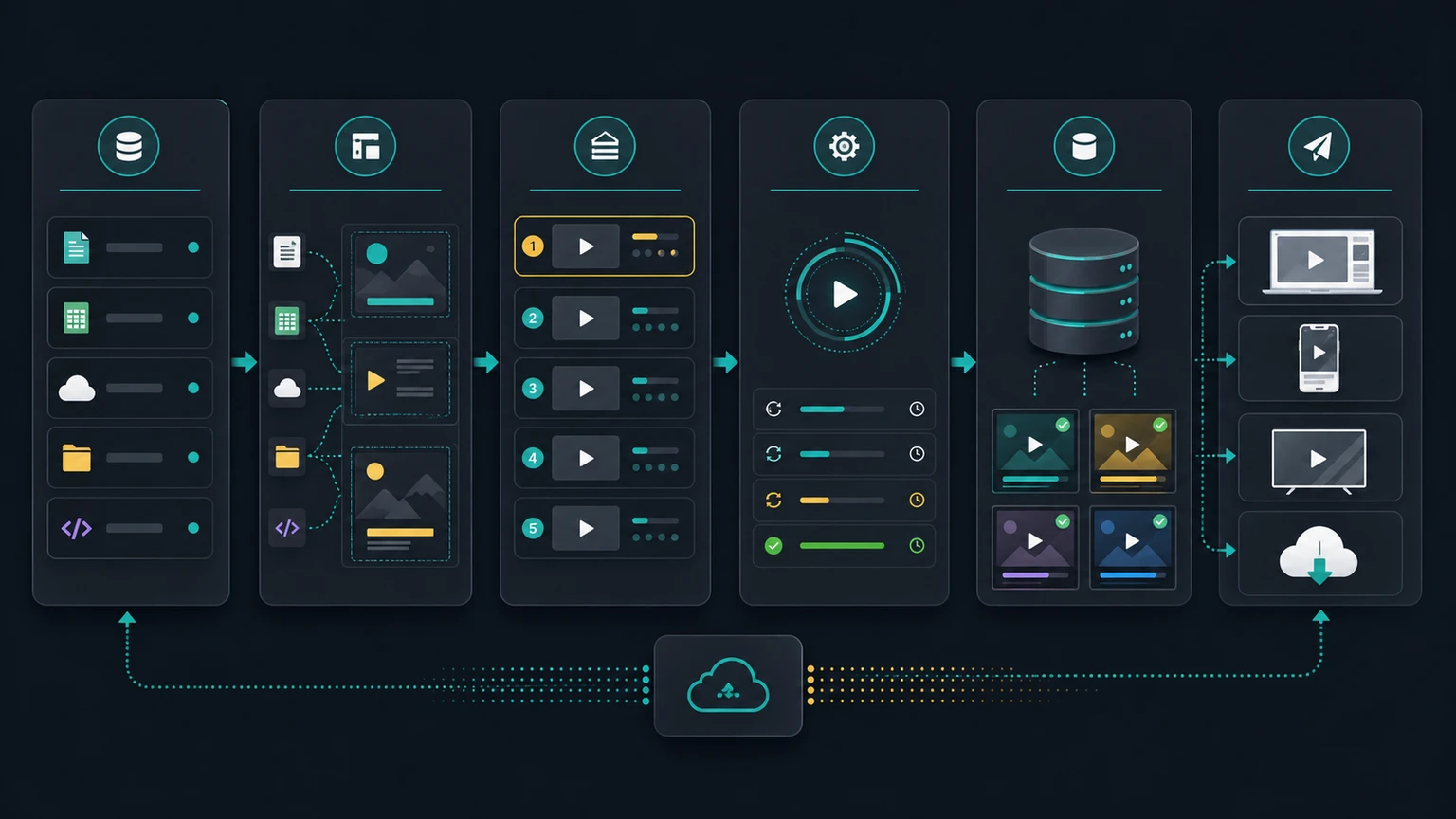
Separate data mapping, queue control, rendering, polling, and delivery so each stage can be retried independently.
This architecture helps teams avoid the main failure mode in bulk rendering: losing track of which source record produced which job, which payload version was used, and whether a failure should be fixed in data, template logic, media assets, or orchestration code.
For a production system, store at least the source record ID, template version, generated payload, submitted job ID, current job state, error details, completed video URL, and timestamps. That record becomes the audit trail for every generated video.
Copy-paste Zvid bulk render payload
The renderable payload below demonstrates a single output from a bulk campaign. In a real 1,000-video workflow, your application would generate a variation of this payload for each source record by changing the title, audience segment, CTA, accent color, media URLs, or output format.
{
  "name": "bulk-video-generation-api-demo",
  "resolution": "hd",
  "duration": 9,
  "frameRate": 30,
  "outputFormat": "mp4",
  "backgroundColor": "#07111F",
  "visuals": [
    {
      "type": "SVG",
      "width": 1280,
      "height": 720,
      "track": 1,
      "svg": "<svg width='1280' height='720' viewBox='0 0 1280 720' xmlns='http://www.w3.org/2000/svg'><defs><linearGradient id='bg' x1='0' y1='0' x2='1' y2='1'><stop offset='0' stop-color='#07111F'/><stop offset='1' stop-color='#17233D'/></linearGradient><linearGradient id='accent' x1='0' y1='0' x2='1' y2='0'><stop offset='0' stop-color='#2DD4BF'/><stop offset='1' stop-color='#FADD46'/></linearGradient></defs><rect width='1280' height='720' fill='url(#bg)'/><rect x='64' y='70' width='1152' height='580' rx='30' fill='rgba(255,255,255,0.045)' stroke='rgba(255,255,255,0.14)'/><text x='104' y='136' fill='#FFFFFF' font-family='Arial' font-size='32' font-weight='800'>Bulk render run</text><text x='104' y='176' fill='#BFC7DE' font-family='Arial' font-size='20'>One template becomes many API jobs</text><rect x='104' y='232' width='250' height='290' rx='24' fill='rgba(7,13,30,0.8)' stroke='rgba(255,255,255,0.13)'/><text x='229' y='284' text-anchor='middle' fill='#2DD4BF' font-family='Arial' font-size='24' font-weight='800'>Data rows</text><circle cx='156' cy='340' r='14' fill='#2DD4BF'/><rect x='190' y='326' width='110' height='16' rx='8' fill='rgba(255,255,255,0.35)'/><circle cx='156' cy='394' r='14' fill='#2DD4BF'/><rect x='190' y='380' width='128' height='16' rx='8' fill='rgba(255,255,255,0.35)'/><circle cx='156' cy='448' r='14' fill='#2DD4BF'/><rect x='190' y='434' width='92' height='16' rx='8' fill='rgba(255,255,255,0.35)'/><rect x='456' y='232' width='310' height='290' rx='24' fill='rgba(7,13,30,0.8)' stroke='rgba(255,255,255,0.13)'/><text x='611' y='284' text-anchor='middle' fill='#FADD46' font-family='Arial' font-size='24' font-weight='800'>JSON template</text><rect x='502' y='326' width='218' height='18' rx='9' fill='rgba(250,221,70,0.4)'/><rect x='502' y='366' width='168' height='18' rx='9' fill='rgba(255,255,255,0.25)'/><rect x='502' y='406' width='204' height='18' rx='9' fill='rgba(255,255,255,0.25)'/><rect x='868' y='232' width='270' height='290' rx='24' fill='rgba(7,13,30,0.8)' stroke='rgba(255,255,255,0.13)'/><text x='1003' y='284' text-anchor='middle' fill='#FFFFFF' font-family='Arial' font-size='24' font-weight='800'>Render queue</text><rect x='912' y='326' width='184' height='42' rx='14' fill='rgba(45,212,191,0.18)' stroke='rgba(45,212,191,0.55)'/><rect x='912' y='388' width='184' height='42' rx='14' fill='rgba(250,221,70,0.16)' stroke='rgba(250,221,70,0.5)'/><rect x='912' y='450' width='184' height='42' rx='14' fill='rgba(255,255,255,0.12)' stroke='rgba(255,255,255,0.24)'/><path d='M370 376 H428' stroke='url(#accent)' stroke-width='8' stroke-linecap='round'/><path d='M782 376 H840' stroke='url(#accent)' stroke-width='8' stroke-linecap='round'/><rect x='246' y='574' width='788' height='36' rx='18' fill='rgba(255,255,255,0.1)'/><rect x='246' y='574' width='560' height='36' rx='18' fill='url(#accent)'/><text x='640' y='638' text-anchor='middle' fill='#C8D2F1' font-family='Arial' font-size='18'>Submit, poll, store, retry only when needed</text></svg>"
    }
  ]
}
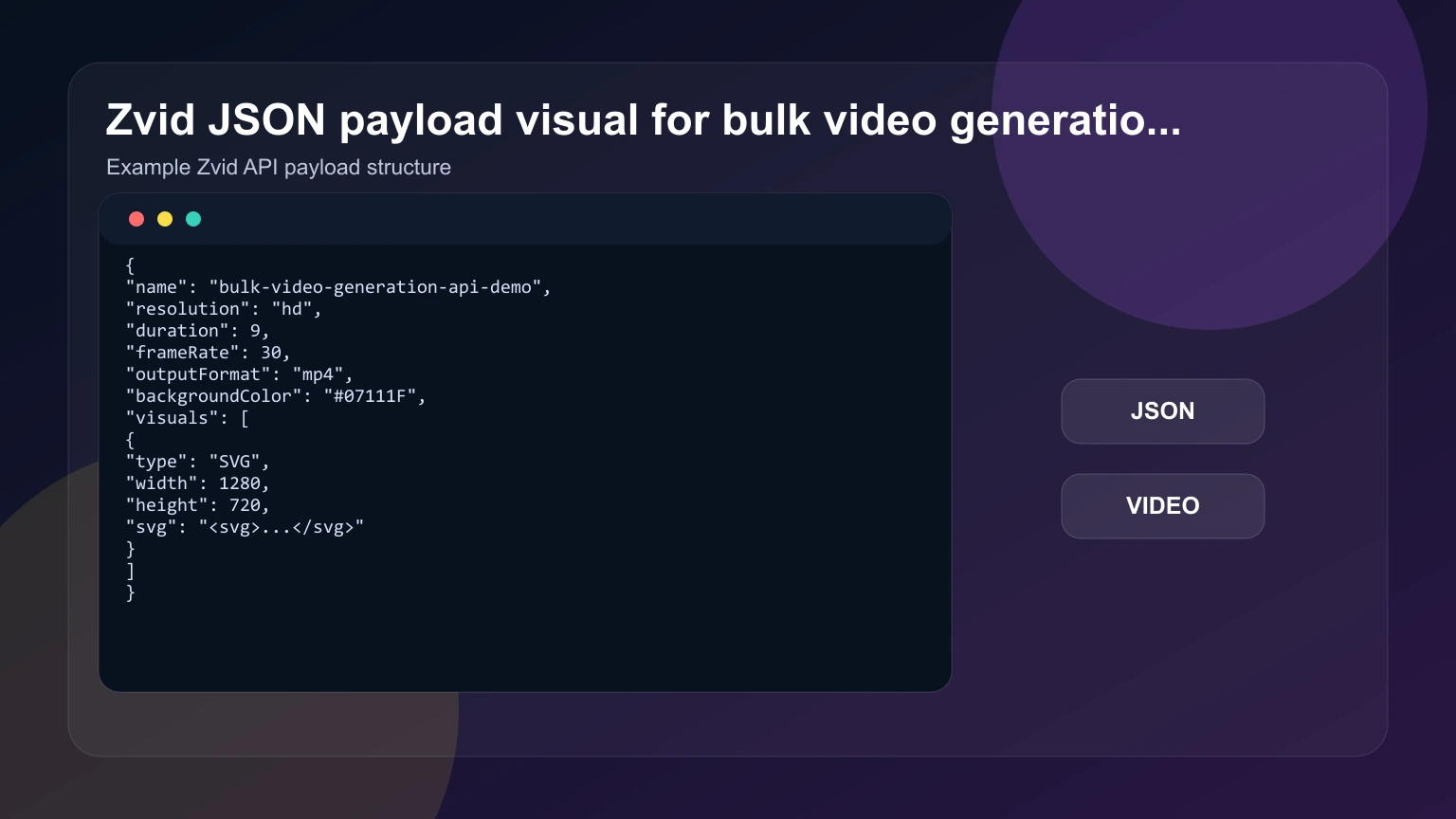
The payload visual is generated from the real renderable bulk workflow example.
For the public render endpoint, wrap the project inside a top-level payload field:
{
  "payload": {
    "name": "bulk-video-generation-api-demo",
    "resolution": "hd",
    "duration": 9,
    "frameRate": 30,
    "outputFormat": "mp4",
    "visuals": []
  }
}
How the API workflow works
In a single render, your application builds one payload, submits it, and polls one job. In bulk rendering, the same steps happen many times, so the orchestration layer matters as much as the payload.
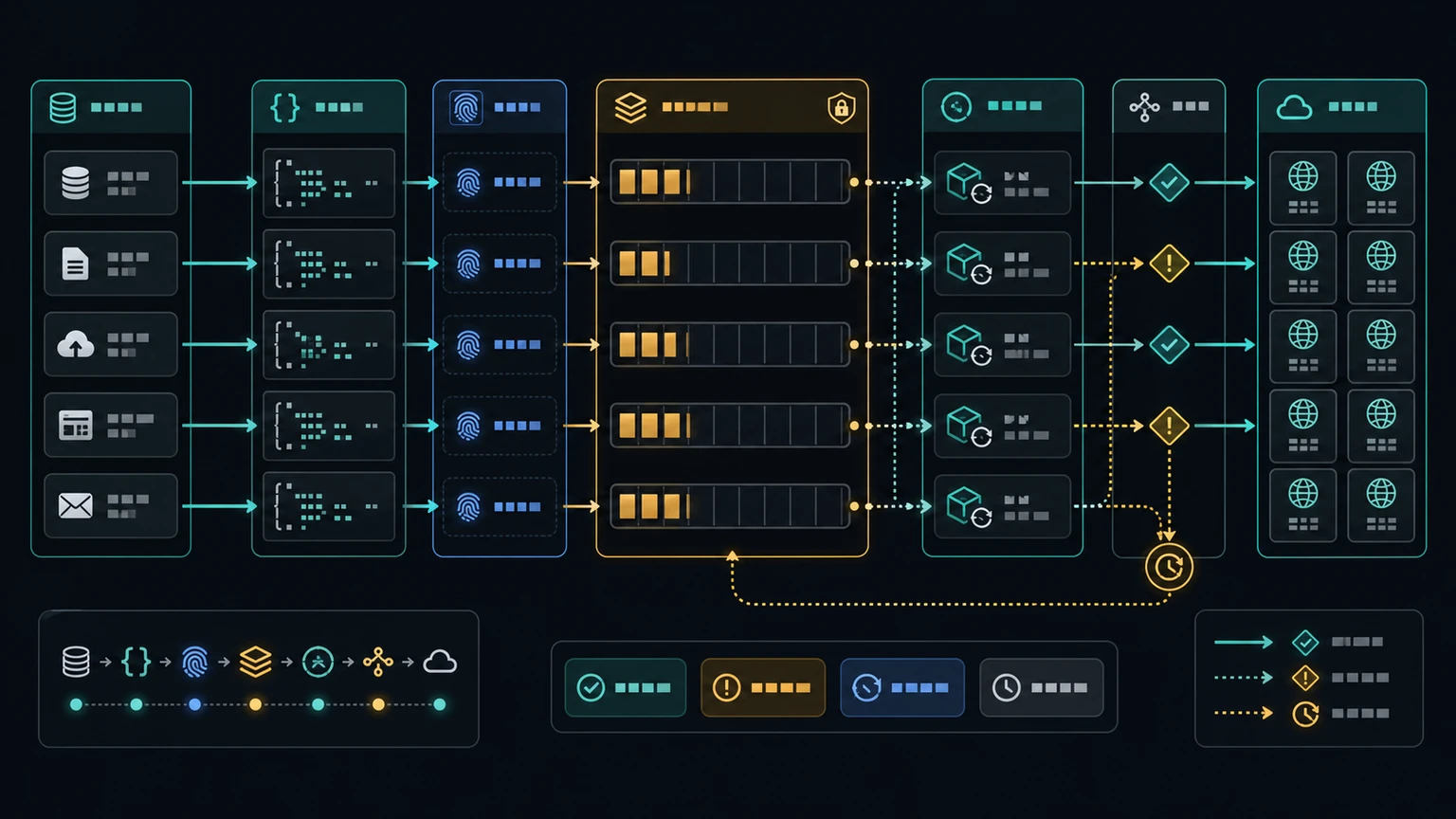
A bulk renderer should keep source records, payloads, job IDs, and final URLs connected.
A practical implementation looks like this:
- Read a batch of source records from your database, CSV, CMS, or product feed.
- Normalize values so every record has safe text, color, media URL, and timing fields.
- Generate one Zvid payload per record using a versioned template.
- Submit jobs through the render endpoint at a controlled concurrency.
- Store each returned
jobIdnext to the source record and payload version. - Poll the jobs endpoint until each job is
completedorfailed. - Save
result.urlfor completed jobs and storefailedReasonfor failed jobs.
This structure gives you a clean answer to the most important operational question: "What happened to this specific video?" You can trace each result from original data to payload to render job to final URL.
Design the job queue before the template
For high-volume video rendering, a queue is not an implementation detail. It is the control surface that protects your source systems, API usage, review process, and retry logic.
The queue should know:
- Which source record is being rendered.
- Which template version created the payload.
- Whether the job is waiting, submitted, active, completed, failed, or blocked.
- How many retry attempts have happened.
- Whether the failure came from input data, media availability, authentication, credits, rate limits, or an unexpected service error.
You do not need to submit every planned video at once. In many teams, the safer pattern is to submit a small window of jobs, poll those jobs, then submit more as capacity clears. That keeps the run observable and makes it easier to pause if the source data or template has a problem.
Build render payloads from structured data
Bulk rendering works when every variable part of the video is explicit. A product launch video might vary title, price, product image, brand color, disclaimer text, and CTA. A sales outreach video might vary company name, region, benefit copy, chart values, and logo URL. A learning platform might vary lesson title, step number, example screenshot, and outro link.
Before generating payloads, define a template contract:
- Required fields that must exist before submission.
- Optional fields with fallback copy or fallback visuals.
- Text length limits for titles, captions, and CTAs.
- Media URL checks for images, videos, GIFs, and audio.
- Output settings such as aspect ratio, duration, frame rate, and format.
- Naming rules for jobs and output files.
That contract is what turns bulk video generation from a fragile loop into a predictable automation workflow. If a record fails the contract, do not submit it. Mark it as blocked, show the missing fields, and let the data owner fix it.
Where AI video generation APIs fit
Many teams search for an AI video generation API when they need to generate videos from prompts, reference images, existing video assets, or text-to-video generation models. Those systems can be useful when the creative content itself needs to be generated. Bulk business video workflows often need a different layer: a repeatable video API that can assemble approved text, images, clips, captions, brand styles, aspect ratios, and CTAs into completed videos.
That distinction matters. A prompt can help create an idea, a voiceover, an image, a short video, or a storyboard. A JSON template controls how those assets appear in a consistent output. In a high-volume workflow, you may use AI models upstream to draft copy, summarize a product, choose a visual style, or generate reference images, then use Zvid to render the final structured video through API access.
For bulk rendering, focus less on one generation model and more on the workflow boundary:
- What data creates each video?
- Which assets are generated, approved, or pulled from an existing library?
- Which template controls layout, duration, timing, and aspect ratio?
- Which endpoint creates the render job?
- Where do completed videos, previews, thumbnails, and failures get stored?
This keeps automation practical. Your team can improve prompts, templates, data cleanup, and review steps independently instead of treating video creation as one opaque request.
For example, a text prompt might create source copy, a video generation model might create a short clip, and an image-to-video tool might create motion from reference images. Those assets still need a production workflow: choose the right aspect ratio, place captions away from key visuals, add a CTA, create a preview, and store the completed video. Zvid fits after those creative steps when your application needs to turn approved inputs into consistent outputs for TikTok-style vertical clips, square social posts, landing page videos, or internal campaign variants.
Polling, retries, and failure handling
Zvid render jobs are asynchronous, so your application should treat the initial 202 response as the start of a workflow, not the final result. Save the returned jobId, then poll the job endpoint until the state is terminal.
For polling, use a steady interval and store the latest state. A simple implementation can poll every few seconds. A larger system can back off older jobs, prioritize recently submitted jobs, and stop polling after a failure or completion.
Retry rules should be narrow:
- Retry temporary network errors around your own request.
- Retry a job submission only if you know the first attempt did not create a job, or if you use a caller-side idempotency strategy.
- Do not blindly retry validation failures. Fix the generated payload or source data.
- Do not blindly retry missing media. Check whether the source URL is public, reachable, and intended for the render.
- Store failed payloads so developers can reproduce and repair the issue.
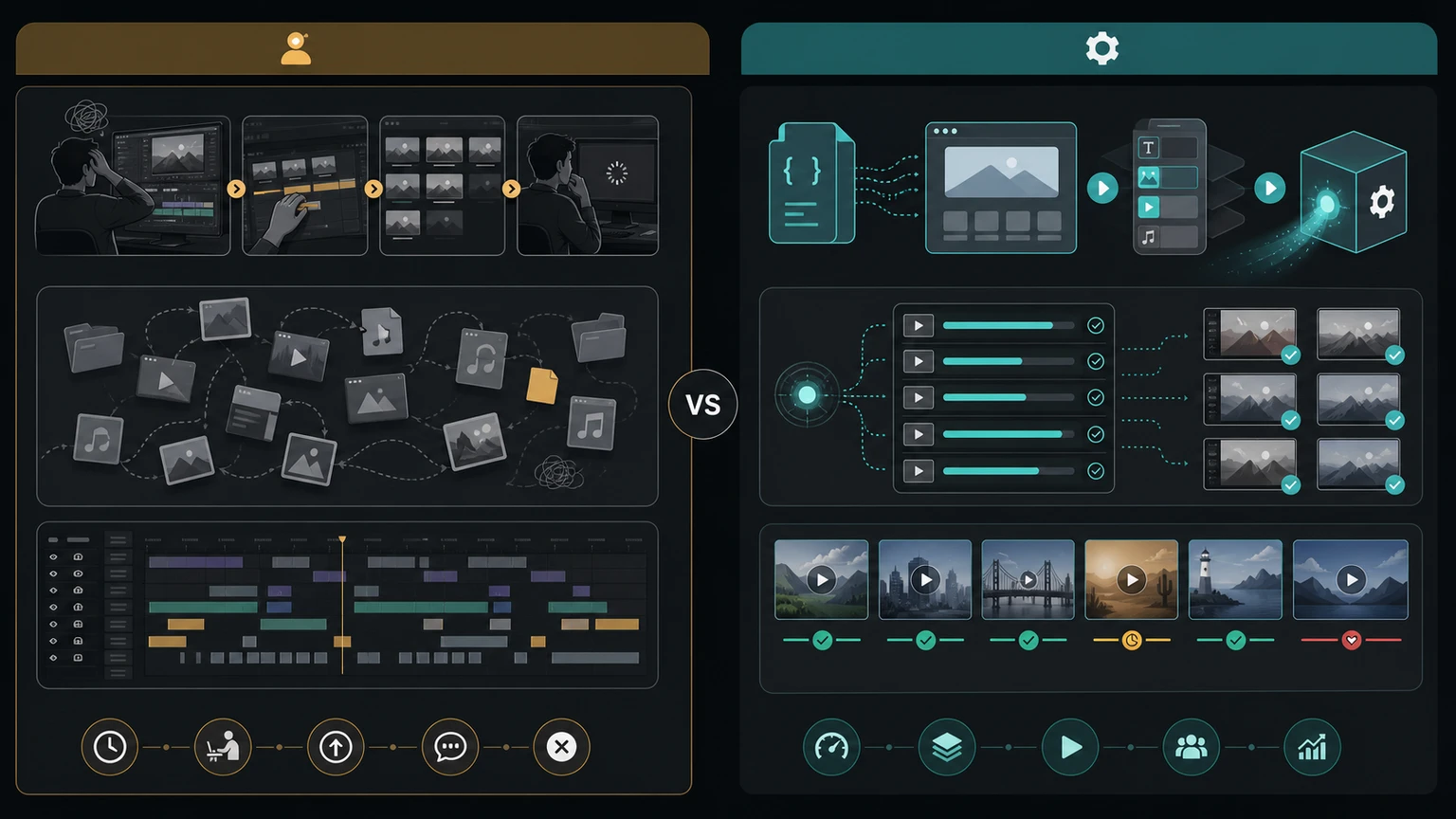
Bulk rendering is strongest when repeatability, audit trails, and structured variation matter more than manual timeline editing.
The goal is not to hide every failure. The goal is to make failures inspectable. A good bulk pipeline lets someone answer whether the issue is bad input data, a broken media URL, an oversized text field, an expired API key, insufficient credits, or an orchestration bug.
Common mistakes
The most common mistake is trying to scale a one-off render script without adding state. Once you generate hundreds or thousands of videos, state is the product: source record state, payload state, job state, and delivery state.
Other mistakes include:
- Submitting every render at once without a queue window.
- Generating payloads from unvalidated source data.
- Not storing the exact payload used for each render.
- Reusing one layout across landscape, square, and portrait formats without checking text fit.
- Polling forever after a job has reached a terminal state.
- Retrying failures without classifying why they failed.
- Losing the relationship between source record, job ID, and final video URL.
- Treating media URLs as reliable without checking access and file type.
- Updating a template during a run without recording the template version.
- Shipping the first bulk run without reviewing a representative sample.
The fix is to make the workflow boring on purpose. Validate first, submit in controlled batches, poll consistently, store outcomes, and review a sample before increasing volume.
How to choose a bulk video generation API
The right bulk video generation API depends on whether your team needs generative video content, template-based video automation, or both. When evaluating AI video generator API options, separate creative generation from production rendering. A generative API may focus on prompts, reference images, image-to-video generation, text-to-video generation, or video extension. A template rendering API focuses on predictable output: the same layout, timing, aspect ratio, and brand rules applied across many source records.
For a high-volume workflow, evaluate the API around operations rather than demos:
- Input model: Can your application send structured data, JSON templates, media URLs, and text variables, or does every request depend on a prompt?
- Endpoint behavior: Does the API return a job ID for asynchronous rendering, and can your app poll or track completed videos?
- Authentication: Can API key access be kept server-side, away from client UI code?
- Output controls: Can you set duration, frame rate, output format, background color, layout, and aspect ratio for each render?
- Template control: Can developers version the payload and reproduce the same video later?
- Preview and review: Can your workflow store previews, thumbnails, failed payloads, and final URLs for human review?
- Automation fit: Can it integrate with your CRM, CMS, product feed, spreadsheet, database, or internal application?
This is also where AI and deterministic rendering can work together. AI models can create short video clips, draft scripts, generate images, or suggest variants. Zvid can then assemble approved assets into a consistent final video through a JSON payload and render endpoint. That combination gives teams creative flexibility without giving up operational control.
Do not choose video generation APIs from a demo clip alone. For bulk production, run a small batch and compare source data quality, prompt reliability, template fit, generation speeds, preview review time, failure messages, and completed video storage. The best API for one-off AI videos may not be the best API to generate videos repeatedly from a database or product feed.
When to use Zvid
Use Zvid when your application needs repeatable server-side video rendering from structured JSON. It is a strong fit for e-commerce teams, agencies, marketing operations, AI video products, learning platforms, real estate workflows, internal enablement systems, and product-led growth teams that need many related video outputs.

One JSON render pipeline can power many repeatable video formats when the source data is structured.
Zvid is especially useful when you need:
- One template rendered across many records.
- Programmatic control over text, media, timing, layout, and output settings.
- Hosted render jobs with API submission and polling.
- A workflow that can be integrated into a CMS, CRM, product feed, internal tool, or automation platform.
- Reviewable JSON payloads instead of hidden timeline edits.
If your team needs one handcrafted flagship video, a manual editor may be the better tool. If you need hundreds of product variants, personalized clips, localized videos, listing videos, onboarding snippets, or campaign creatives, a JSON-to-video API gives your engineering team a clearer system boundary.
Start with ten records, review the outputs, fix the template, then increase the queue window. Bulk video generation is easiest to scale after the template has already survived a small real batch.
FAQs
What is a bulk video generation API?
A bulk video generation API lets software create many videos from structured data by submitting render jobs programmatically instead of editing each video manually.
Is bulk video generation the same as text-to-video generation?
Not exactly. Text-to-video generation creates video content from a prompt, while bulk video generation usually maps structured records into repeatable templates and render jobs.
How do I generate 1,000 videos automatically?
Use a reusable video template, map each source record into a JSON payload, submit one render job per output, poll each job, and store the completed video URLs next to the source records.
Should I submit all 1,000 render jobs at once?
Usually no. A controlled queue window is easier to monitor, pause, and retry than a single burst of every planned job.
What should I store for each generated video?
Store the source record ID, template version, generated payload, render job ID, current state, failure reason if any, final video URL, and timestamps.
How do retries work in bulk video rendering?
Retry temporary request or network failures carefully, but do not blindly retry validation errors, bad media URLs, insufficient credits, or payload bugs.
Can I use product feeds or CSV files for bulk video generation?
Yes. Product feeds and CSV files are common sources because they already contain structured fields that can map into video titles, media, prices, CTAs, and styling.
Does every video need a different JSON payload?
Each output should have its own payload, but the payloads can come from one reusable template. The template stays stable while the data changes.
When is bulk rendering better than manual editing?
Bulk rendering is better when the videos share a repeatable structure and differ mostly by data, media, language, offer, audience, or format.
Can AI models be part of a bulk video workflow?
Yes. AI models can help draft copy, generate source visuals, summarize records, or suggest variants, while a JSON render template controls the final video structure.
What features matter in a bulk video generation API?
Look for server-side API access, asynchronous job status, structured template inputs, output controls, aspect ratio options, preview or thumbnail storage, and clear failure reporting.